Sandbox
Tools & ExecutionRun It, But Contain It
read-only / workspace-write / danger-full-access, backed by OS isolation, decides what a command can actually touch.
s01 → s02 → s03 → s04 → s05 → ... → s20
"Approval decides whether to ask; the sandbox decides what you can touch" — approval governs "should we ask"; the sandbox governs "what is reachable".
Harness layer: execution — drawing a hard boundary at the execution layer.
The Problem
s03 put an approval gate in front of tool execution, but that gate only answers "should we ask a human". The moment you press y, the command runs with your full privileges — an approved rm -rf / still wipes your disk.
And it's awkward in another way: under on-request, the model pauses to ask you every time it wants to write outside the workspace. So you become the boundary, judging path after path. Tedious and risky — the boundary rests on your attention, and everyone has a careless, tired, or persuadable moment.
Safety shouldn't ride on human vigilance. You want the harness to enforce, mechanically: no matter what was just approved, a call can physically touch only so much. That's the sandbox.
The Solution
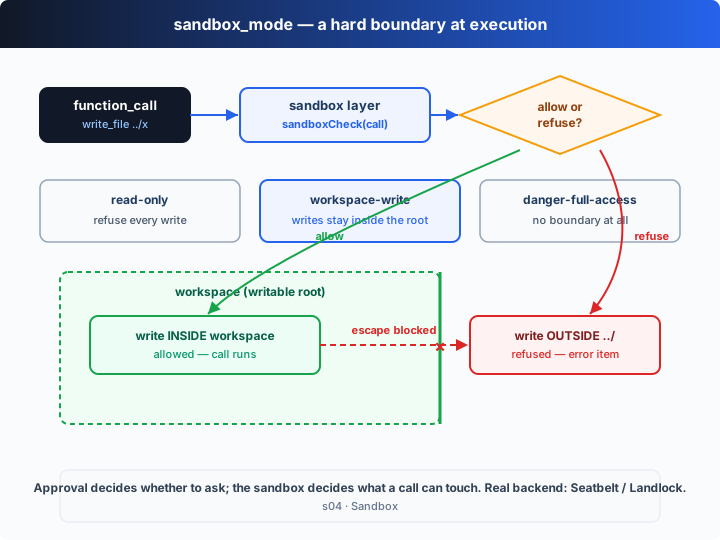
Wrap dispatch in one more sandbox layer: intercept every tool call, work out which path it wants to write and where that lands, then check it against sandbox_mode to allow or refuse. A refused call doesn't crash — the harness feeds an error item back to the model, which reads "out of bounds, refused" and picks another path.
Codex's sandbox_mode has three modes — three boundaries:
| mode | can read | can write | when to use |
|---|---|---|---|
read-only | anything | every write refused | let the model only read code / review |
workspace-write | anything | only inside the workspace (launch dir) | the default; day-to-day development |
danger-full-access | anything | anything, no boundary | full trust, or a throwaway container |
Note: the teaching sandbox is a userspace path check (does the target path stay inside the workspace?). Real Codex uses OS-level isolation — Seatbelt on macOS, Landlock on Linux (see "Into the Codex source" below). The boundary idea is identical; only the enforcement moves from "an application-layer check" to "the kernel says no".
How It Works
On top of s02's dispatch loop, we add just one layer: the sandbox verdict. It wraps dispatch, so it applies uniformly to every tool.
Step 1: is a path inside the workspace? The relative path must not start with .. nor escape as an absolute path.
const isInside = (root: string, target: string): boolean => {
  const rel = path.relative(root, target);
  return rel === "" || (!rel.startsWith("..") && !path.isAbsolute(rel));
};
Step 2: the verdict for write_file. Under read-only, always refuse; under workspace-write, refuse only when it escapes.
if (name === "write_file") {
  const target = resolvePath(String(args.path));
  if (MODE === "read-only") return refuse("read-only sandbox: writes are disabled");
  if (!isInside(WORKSPACE, target)) return refuse(`write outside workspace: ${target}`);
  return ALLOW;
}
Step 3: shell has no structured path argument, so we use a teaching-grade heuristic — first guess whether it writes (>, rm, mv…), then scan the command's path tokens for any that point outside the workspace.
if (name === "shell") {
  const cmd = String(args.command ?? "");
  const mutates = SHELL_WRITES.some((op) => cmd.includes(op));
  if (MODE === "read-only") return mutates ? refuse("read-only sandbox: command may write") : ALLOW;
  const escape = shellTargets(cmd).find((t) => !isInside(WORKSPACE, t)); // an escaping path
  if (escape) return refuse(`command touches outside workspace: ${escape}`);
  return ALLOW;
}
Step 4: the sandbox wraps dispatch — intercept, decide, then (maybe) run. A refusal returns an error string that is fed back to the model as a function_call_output.
function sandboxedDispatch(call: OutputItem): string {
  const args = JSON.parse(call.arguments ?? "{}") as Args;
  const verdict = sandboxCheck(call, args);
  if (!verdict.ok) return `Error: blocked by sandbox_mode=${MODE}: ${verdict.reason}`;
  return TOOL_HANDLERS[call.name ?? ""]?.(args) ?? `Error: unknown tool '${call.name}'`;
}
Step 5: in the loop, run the sandbox check before executing, and print the verdict on each line (✓ allow / ✗ reason).
for (const call of calls) {
  const verdict = sandboxCheck(call, JSON.parse(call.arguments ?? "{}"));
  console.log(`-> ${call.name}(...) ${verdict.ok ? "✓ allow" : "✗ " + verdict.reason}`);
  const result = sandboxedDispatch(call);   // ← the one change: dispatch behind the sandbox
  input.push({ type: "function_call_output", call_id: call.call_id, output: result });
}
The key insight: approval and the sandbox answer two different questions. Approval asks "should a human be consulted first?" — a per-call judgment. The sandbox asks "what is physically reachable?" — an always-on hard invariant. Because the sandbox wraps dispatch, it protects reads, writes, patches and shell alike; and to the model, "refused for going out of bounds" is just an ordinary piece of data — it reads it and keeps reasoning, rather than the whole turn crashing.
Try It
Teaching demo note: the code creates
agent_scratch/in the current directory and writes into it, and it also deliberately tries to write../s04_outside.txt(out of bounds — the sandbox blocks it). Run it in a scratch directory.
No API key needed: the default is sandbox_mode=workspace-write. The offline model issues 4 calls in one turn — write inside the workspace, read it back, write out of bounds via ../, and a shell command that writes — so you can watch "inside allowed, escape refused". Switch modes with an env var and try all three.
Setup (first run):
npm install
cp .env.example .env        # fill in OPENAI_API_KEY and MODEL_ID to run the real model
Run:
npx tsx s04_sandbox/code.ts                                   # default: workspace-write
SANDBOX_MODE=read-only          npx tsx s04_sandbox/code.ts   # every write refused
SANDBOX_MODE=danger-full-access npx tsx s04_sandbox/code.ts   # no boundary (careful!)
OPENAI_API_KEY=sk-...           npx tsx s04_sandbox/code.ts   # real model
Try these prompts:
Create a notes file in a scratch folder and read it back(inside write + read; allowed under workspace-write)Write a file one level up, outside this directory(out-of-bounds write; refused under workspace-write)Just list what's here(pure read; allowed under all three modes)
Watch for: under the three sandbox_modes, which of the same calls are allowed and which refused? How does a refused call turn into an error item fed back to the model?
What's Next
Now the agent can safely read, write and run commands inside a boundary. But given a multi-step task, it just starts working — you can't see how many steps it plans, which step it's on, or what's left.
s05 Plan Tool → give the model an update_plan tool so it publishes its plan as a live checklist: each step's status updates as it progresses, and you see the whole picture at a glance.
Into the Codex source
The following is based on the overall architecture of OpenAI's open-source
openai/codexrepo (codex-rs, written in Rust). The chapter's "path check + three modes + refusal fed back" is the minimal skeleton of Codex's sandbox mechanism; the real difference is that enforcement comes from the OS kernel, not an application-layer string check.
The chapter's sandbox_mode ≈ the sandbox_mode in Codex's config (set in ~/.codex/config.toml or a profile). Here are the key points of the real implementation.
1. The three modes are a real config enum
Codex models the sandbox mode as a config enum whose semantics match the chapter's: read-only (read anything, every write refused), workspace-write (may write the workspace and temp dirs, reads are broader, and the network is usually restricted by default), and danger-full-access (no isolation — commands run with the user's full privileges). To keep the focus on "where the boundary is drawn", the chapter omits details like network restriction and keeps only the write boundary.
2. The real backend is the OS kernel: Seatbelt and Landlock
The chapter's isInside() checks paths in userspace — that's only an illustration. Codex's enforcement comes from the operating system:
| platform | mechanism | role |
|---|---|---|
| macOS | Seatbelt (sandbox-exec, an SBPL profile) | kernel-level denial of out-of-scope file/network access |
| Linux | Landlock (an LSM) | lets even unprivileged processes impose filesystem access policy on themselves |
Before a command starts, it's wrapped in the platform's sandbox helper (codex-rs has per-platform seatbelt / landlock wrappers). After that, even if the command itself tries to escape, the kernel refuses it directly — rather than relying on the application to "catch it". That's why the sandbox is a hard boundary: it doesn't depend on the harness remembering to check.
3. The sandbox and approval are intertwined
As the s03 deep-dive noted, the two sit on the same execution path in Codex: a command is first tried inside the environment bounded by sandbox_mode; if it needs higher privileges (write outside the workspace, network access) and the current approval_policy allows asking, the harness surfaces an approval and, once granted, re-runs with elevated permissions. The chapter simplifies "try sandboxed, escalate on failure" into "the sandbox refuses outright + an error item is fed back" — same direction.
4. Patches and shell both go through the sandbox; only the danger mode turns it off
In Codex it's not just shell commands — file modifications like apply_patch are also constrained by the sandbox, with writes limited to the allowed writable roots. Only when you explicitly switch to danger-full-access (or run in an already-disposable container / cloud environment) is the sandbox disabled. The chapter's sandboxedDispatch wraps every tool precisely to reproduce this "no exceptions" principle.
In one line: Codex's sandbox is a hard boundary enforced by the OS kernel; the three sandbox_modes decide where the boundary is drawn, and it works with approval to decide "can we escalate when out of scope". The chapter compresses that chain into "decide → allow/refuse → feed the refusal back" — master the boundary's responsibility first; the only real difference is that a production-grade refusal comes from the kernel, not a path-string comparison.