Automations
Concurrency & AutomationWork on a Schedule
Recurring work should be created by the harness, not remembered by the model.
s01 → ... → s13 → s14 → s15 → ... → s20
"Set the schedule, the harness runs itself" — time-driven triggering, decoupling scheduling from execution.
Harness layer: concurrency & automation — an independent scheduler judges the time, a queue carries the trigger.
The Problem
An alarm clock doesn't need you watching it to go off. You set 7:00, and it rings on its own — whether you're asleep, in the shower, or cooking.
Until now every chapter's agent has been reactive: you type a line, it runs one turn. s13 let the agent run slow tasks in the background, but you still kicked that task off by hand.
Periodic work — "run the tests every morning at 9", "check whether CI went red every 30 minutes" — shouldn't need a human to push it each time. Letting the harness decide when to run a turn is the mechanism this chapter adds.
The Solution
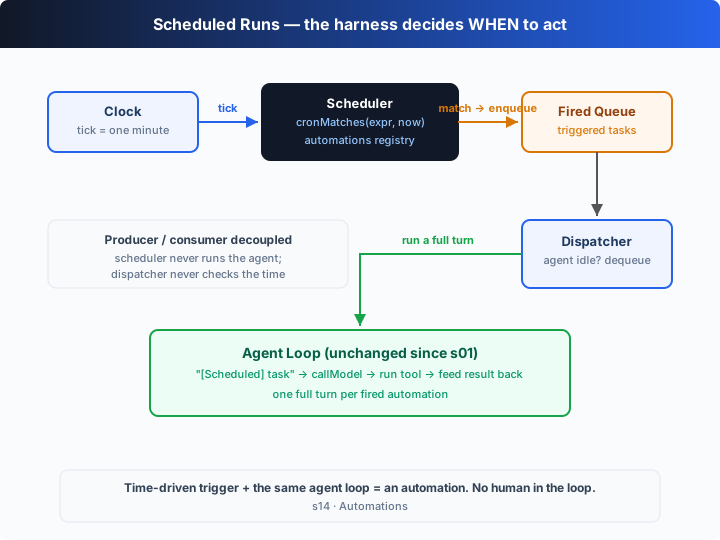
Add a scheduler: on every tick it matches the current time against each automation's cron expression. A matched task is not run directly — it's pushed onto a fired queue. On the other side, a dispatcher pops a task whenever the agent is idle and runs a full turn with the same agent loop from s01. Triggering (scheduler) and execution (dispatcher) are decoupled by the queue.
Manual vs scheduled triggering:
| manual (s01–s13) | scheduled (s14) | |
|---|---|---|
| trigger | user input | scheduler (cron match) |
| when | whenever a human types | the moment the cron expression names |
| human needed | yes | no: auto-enqueue, auto-run when idle |
| what runs | the current conversation | one full agent turn |
The teaching version uses a simulated clock (one minute per tick) so the demo finishes in seconds; the cron matcher has real semantics, so swapping in a real clock makes it fire on real time.
How It Works
Four pieces: cron matching, the scheduler (producer), the dispatcher (consumer), and the unchanged agent loop.
Step 1: cron field matching — supports *, */N, N, N-M, and comma lists.
function cronFieldMatches(field: string, value: number): boolean {
  for (const part of field.split(",")) {
    if (part === "*") return true;
    const step = /^(\*)\/(\d+)$/.exec(part);
    if (step && value % Number(step[2]) === 0) return true;
    const range = /^(\d+)-(\d+)$/.exec(part);
    if (range && value >= Number(range[1]) && value <= Number(range[2])) return true;
    if (/^\d+$/.test(part) && value === Number(part)) return true;
  }
  return false;
}
Step 2: five-field semantics. Minute, hour and month must ALL match; when day-of-month and day-of-week are both constrained, EITHER matching is enough (OR).
if (!(cronFieldMatches(minute, t.minute) &&
      cronFieldMatches(hour, t.hour) &&
      cronFieldMatches(month, t.month))) return false;
if (dom === "*" && dow === "*") return true;
// one constrained → use it; both constrained → OR them
return domOk || dowOk;
Step 3: the scheduler is the producer. Each tick advances the simulated clock one minute and enqueues every automation that fires — it never runs anything itself. A one-shot task is deregistered right after firing.
tick(now: SimTime): void {
  const marker = `${now.hour}:${now.minute}@${now.dom}`;
  for (const a of [...this.automations.values()]) {
    if (!cronMatches(a.cron, now) || a.lastFired === marker) continue;
    a.lastFired = marker;                 // never fire twice in the same minute
    firedQueue.push(a);                   // enqueue only, never run
    if (!a.recurring) this.automations.delete(a.id);
  }
}
Step 4: the dispatcher is the consumer. It ignores the time entirely; when the agent is idle it pops one task and runs a full agent turn. It exits once the queue is empty and the scheduler has stopped.
async function dispatcher(): Promise<void> {
  while (!halted || firedQueue.length > 0) {
    const job = firedQueue.shift();       // pop when free
    if (!job) { await sleep(TICK_MS / 3); continue; }
    await runAutomation(job);             // s01's agent loop, reused as-is
  }
}
Assembled, producer and consumer touch only through firedQueue:
const drain = dispatcher();               // consumer stays resident
for (let minute = 0; minute <= 5; minute++) {
  scheduler.tick({ minute, hour: 9, dom: 15, month: 7, dow: 3 });  // producer
  await sleep(TICK_MS);
}
halted = true;
await drain;                              // let the queue empty before exiting
The key is decoupling: the scheduler doesn't know the agent loop exists, and the agent loop doesn't know cron exists. The queue is the only contract between them, so each side moves at its own pace without waiting for the other. A scheduled firing is just a "[Scheduled] ..." user message dropped into the queue — everything after that is exactly s01.
Try It
Teaching demo note: the offline demo runs read-only shell commands (
git status, etc.). Run it in a scratch directory; the real approval + sandbox system is s03/s04.
No API key needed: this chapter is a self-running demo with no REPL. Without OPENAI_API_KEY it uses a built-in offline scripted model — it picks a read-only command for the task, runs it, and reports, walking the whole "trigger → enqueue → dispatch → run a turn" path.
Setup (first run):
npm install
cp .env.example .env        # fill in OPENAI_API_KEY and MODEL_ID to run the real model
Run:
npx tsx s14_automations/code.ts                # offline demo model
OPENAI_API_KEY=sk-... npx tsx s14_automations/code.ts   # real model
Try these tweaks:
- Change one automation's cron to
"* * * * *"and watch it fire on every tick. - Run with a real key and watch how the model picks a command for "run the test suite".
- Add another
recurring: falseone-shot task and watch it fire once, then deregister.
Watch for: the scheduler (producer) only enqueues on a match and never executes; the dispatcher (consumer) only pops when idle and never checks the time. They meet only through the queue.
What's Next
Now a single agent can run itself on a schedule. But many tasks are too big for one: "refactor the whole backend" spans auth, the database, routing and tests — more detail than one context window holds.
s15 Agent Teams → give two named teammates their own contexts and let them split a task by trading messages over asynchronous mailboxes.
Into the Codex source
The following is based on the overall structure of OpenAI's open-source
openai/codexrepo (codex-rs, written in Rust) and on Codex Cloud's automation capabilities. The chapter's "scheduler + queue + the same agent loop" is the minimal skeleton of "when to run, what to run"; the real implementation makes scheduling, persistence and the run environment production-grade.
The chapter's automation ≈ one scheduled Codex task. The differences are who hosts the schedule and where it runs.
1. Where the schedule lives: local process vs Codex Cloud
The chapter's scheduler runs inside the agent process: kill the process and scheduling stops. Codex's automations live mainly in Codex Cloud — you configure a scheduled task for a repo + environment (say, a nightly run), and cloud infrastructure fires it on a cadence regardless of whether your laptop is awake. To get the same effect locally you typically wire the system cron / systemd timer to codex exec, letting the OS-level scheduler launch a headless run when the time comes.
2. What one firing runs: a headless `codex exec` turn
The chapter runs one runAutomation per firing — a full agent turn. Codex's counterpart is codex exec (non-interactive mode): given a prompt it runs one complete turn (model → tool → feed back → until done), prints the result, and exits. An automation is essentially "scheduler fires + codex exec runs a turn". The chapter's dispatcher plays the codex exec role.
3. Triggers are events, not just cron
The chapter has exactly one trigger source: cron. Real systems offer more: schedules (cron), repo events (a new PR, CI going red), webhooks, even another agent's output. But they share one abstraction — a trigger drops a task onto a queue, and an executor consumes it when idle. The chapter's firedQueue is that abstraction at its smallest: swap in any other event source and the consumer side doesn't change at all.
4. Persistence & idempotency
The chapter keeps automations in memory, so they're gone on exit. Production automations persist the task definitions (surviving restarts) and use a marker like the chapter's lastFired to avoid double-firing at the same instant and to catch up on missed firings after a restart. The chapter's lastFired marker (HH:MM@dom) demonstrates exactly this idempotency idea: never fire twice in the same minute.
In one line: the heart of an automation isn't "can run a task" — s01 already could — but "triggers itself when the time comes". Decouple trigger, queue and executor, and cron becomes just one of many trigger sources. Master that decoupling and event-driven agents follow naturally.