Plugins, Apps & Hooks
Codex in DepthExtend Codex Beyond Skills and MCP
Plugins bundle skills/MCP/prompts into installable marketplaces, hooks run on lifecycle events, and codex mcp-server turns Codex itself into a tool.
s01 → ... → s20 → s21 → s22 → s23 → s24 → s25
"Capabilities register around the loop" — a plugin bundles skills, hooks and MCP servers into one install; hooks fire on the loop's lifecycle events; the loop itself never changes.
Harness layer: Codex deep-dive — what changes is not the loop, but who registered a capability into the registry and who hung a command on an event point.
The Problem
s07 covered skills (loading a piece of instructions on demand); s19 covered MCP servers (attaching a set of external tools). Both are "add one thing to the agent at a time." Real teams quickly hit three new pain points:
- Installing one piece at a time is too fragmented. A team wants every member to have "the same skill + the same guard hook + the same MCP server." Should everyone configure it three times by hand? Can't we bundle it into one package and install it with a single command?
- We want to insert our own logic at the loop's key points. Before every tool call, run a "is this command dangerous?" check; after every call, write an audit log; when the session starts, inject a team policy; when a turn ends, send a notification. None of these are new tools — they are custom commands hung on the loop's lifecycle.
- We want other agents to use Codex as a tool. Not Codex calling an MCP server, but turning Codex itself into an MCP server, so another agent / MCP client can call it over stdio.
The common thread: the s01 loop stays put. The question is only how to "register" capabilities around the loop, and how to hang commands on the loop's event points.
The Solution
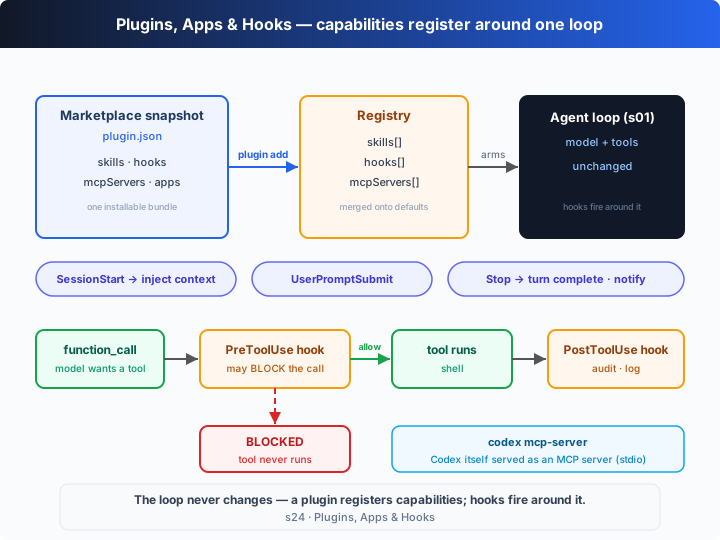
In one sentence: a plugin packages a set of capabilities into an installable unit; a hook fires a custom command on a lifecycle event of the loop; codex mcp-server exposes Codex itself as an MCP server. All of them only write into a "registry" or fire on event points — none of them touch the loop.
The plugin system (the plugins feature, stable, on by default)
A plugin = a plugin.json manifest that bundles skills + hooks + mcpServers (and apps), distributed as a "marketplace snapshot" and installed with one command. The real subcommands (codex plugin --help):
| Command | What it does |
|---|---|
codex plugin add <PLUGIN[@MARKETPLACE]> | Install a plugin from a configured marketplace snapshot; supports --marketplace <name>, --json |
codex plugin list [--marketplace <name>] [--json] [--available] | List plugins available (incl. uninstalled) from marketplace snapshots |
codex plugin marketplace add <SOURCE> | Register a marketplace source: a local path, owner/repo[@ref], or an HTTPS/SSH Git URL; supports --ref, --sparse |
codex plugin marketplace list [--json] | List the marketplaces currently under consideration and their roots |
codex plugin marketplace upgrade | Refresh configured Git marketplace snapshots |
codex plugin marketplace remove <name> | Remove a marketplace source |
codex plugin remove <PLUGIN[@MARKETPLACE]> | Remove an installed plugin from local config and cache |
Related real feature flags (codex features list): plugins, plugin_sharing, and remote_plugin are all stable and on by default. Installing is "supplemented on top of default discovery" — a plugin's skills/hooks/mcpServers merge in rather than replace the built-in defaults.
Apps (the apps feature, stable, on by default)
Apps (Connectors) are packaged, app-like extensions from chatgpt.com/apps. In a user message they can be triggered explicitly via [$app-name](app://{connector_id}), or implicitly when the context suggests them; an installed app's MCP tools are either provided directly or lazy-loaded through tool_search. A separate flag, enable_mcp_apps, is still marked under development. It is essentially "yet another packaging form," so this chapter does not model it in the loop.
The hook system (the hooks feature, stable, on by default)
Hooks are custom commands the harness runs on lifecycle events (from hooks.json or from a plugin), and they are a different thing from "plugin packaging" — a plugin is how you distribute, a hook is what runs at an event point. The real event names (from the local binary):
| Hook event | When it fires | What it can do |
|---|---|---|
SessionStart | Session begins | Inject extra context (team policy, environment info) |
UserPromptSubmit | The user submits a prompt | Review / rewrite / record the input |
PreToolUse | Before a tool call | Can block the call — the real error is "Tool call blocked by PreToolUse hook" |
PostToolUse | After a tool call | Audit, log, format the result |
PermissionRequest | On a permission request | Participate in the approval decision |
SubagentStart / SubagentStop | A subagent starts / stops | Observe the subagent lifecycle |
PreCompact / PostCompact | Around context compaction | Hook into compaction |
Stop | A turn / the agent finishes | Notify, telemetry, wrap up |
SessionEnd | The session ends | Clean up |
Turning Codex into an MCP server (codex mcp-server)
codex mcp-server — Start Codex as an MCP server (stdio). The direction reverses: not Codex connecting out to an external MCP server, but Codex itself running as an MCP server over stdio, so another agent / MCP client can treat "calling Codex" as calling a tool.
How It Works
Let's translate "plugin registration + hook firing" into TypeScript. The core is a registry: installing a plugin merges the manifest's skills/hooks/mcpServers in; running the loop fires hooks on event points.
Step 1: the hook model. A real hook is an external command (a script configured in hooks.json) that the harness runs on an event point, feeding it a JSON payload and reading a decision. PreToolUse can block; SessionStart can inject context.
type HookEvent = "SessionStart" | "UserPromptSubmit" | "PreToolUse" | "PostToolUse" | "Stop";
interface HookDecision { block?: boolean; reason?: string; context?: string }
interface Hook {
  event: HookEvent; name: string;
  command: string;                       // the shell command this hook stands in for
  run: (p: HookPayload) => HookDecision | void;
}
Step 2: a plugin manifest = a "parcel" of capabilities, mirroring the real plugin.json.
interface PluginManifest {
  name: string; marketplace: string;     // installed as name@marketplace
  skills: Skill[]; hooks: Hook[]; mcpServers: string[];
}
Step 3: the registry. installPlugin merges the parcel in on top of default discovery; fire runs every hook registered for an event and collects their decisions.
class Registry {
  skills = new Map<string, Skill>(); hooks: Hook[] = []; mcpServers: string[] = [];
  installPlugin(m: PluginManifest): void {
    for (const s of m.skills) this.skills.set(s.name, s);
    this.hooks.push(...m.hooks); this.mcpServers.push(...m.mcpServers);
  }
  fire(event: HookEvent, payload: Omit<HookPayload, "event">): HookDecision[] {
    const out: HookDecision[] = [];
    for (const h of this.hooks.filter((x) => x.event === event)) {
      const d = h.run({ ...payload, event });
      if (d) out.push(d);
    }
    return out;
  }
}
Step 4: the s01 loop, with hooks hung around it. Note PreToolUse fires before the tool executes — if any hook returns block:true, that command never runs.
async function agentLoop(reg: Registry, prompt: string): Promise<void> {
  const ctx = reg.fire("SessionStart", {}).map((d) => d.context).filter(Boolean).join("; ");
  reg.fire("UserPromptSubmit", { prompt });
  const thread: unknown[] = [{ role: "user", content: (ctx ? `[context] ${ctx}\n\n` : "") + prompt }];
  for (;;) {
    const output = await callModel(thread);
    thread.push(...output);
    const calls = output.filter((i) => i.type === "function_call");
    if (calls.length === 0) { reg.fire("Stop", {}); return; }       // turn finished
    for (const call of calls) {
      const { command } = JSON.parse(call.arguments ?? "{}") as { command: string };
      const blocked = reg.fire("PreToolUse", { tool: "shell", input: command }).find((d) => d.block);
      const result = blocked ? `Tool call blocked by PreToolUse hook: ${blocked.reason}` : runShell(command);
      if (!blocked) reg.fire("PostToolUse", { tool: "shell", input: command, output: result });
      thread.push({ type: "function_call_output", call_id: call.call_id, output: result });
    }
  }
}
The core insight: the loop has not changed since s01. Installing a plugin is just "writing capabilities into the registry"; a hook is just "firing a command on an event point." In the offline demo you will see: the moment devtools@local is installed, the registry gains 1 skill, 4 hooks and 1 MCP server; then as the loop runs, SessionStart injects a "confirm before deleting" policy, so when the model genuinely tries rm -rf ./dist, the PreToolUse guard stops it before it ever runs, while the safe ls -1 is recorded by PostToolUse into an audit log. The interception happens around the loop, not inside it.
Try It
Teaching-demo note: this chapter does not touch your filesystem — the
shelltool only runsls; therm -rfis blocked by a hook before it runs.
No API key needed: this chapter is a self-running demo with no REPL. Without OPENAI_API_KEY, a scripted model drives the loop: it first tries an rm -rf that the guard hook blocks, then runs a safe ls, then finishes — so every kind of hook fires once. Narration goes to stderr.
Setup (first run):
npm install
cp .env.example .env        # fill in OPENAI_API_KEY and MODEL_ID to run the real model
Run:
npx tsx s24_plugins_apps_hooks/code.ts                       # offline demo (plugin + hook trace)
OPENAI_API_KEY=sk-... npx tsx s24_plugins_apps_hooks/code.ts # real model
Try these experiments:
- Run it and read the trace: how does the policy injected by
SessionStartlead to the laterrm -rfbeing blocked before it runs byPreToolUse? (NotePreToolUsefires twice, but the blocked call has no matchingPostToolUse— the tool never ran.) - Edit the
DEVTOOLSmanifest (remove theguard-rmhook) and re-run — doesrm -rfnow execute directly? Feel how "the guard comes from a registered hook, not from the loop." - Run with a real key; the model decides what to do first. Watch the hooks still fire before/after every tool call, independent of the model's choices.
What to watch: the registry contents printed by the plugin lines (skill / hook / MCP-server counts), and that the Stop hook fires only after the agent says its final word — it hangs on the "turn finished" event, not on any single tool call.
What's Next
By now you have seen almost all of Codex's "extension surfaces": skills (s07), MCP (s19), plugins / Apps / hooks (this chapter), and codex mcp-server, which turns Codex itself into an MCP server. They all obey the same iron rule — register around the loop; never rewrite the loop.
s25 takes you up a level, to "how one agent divides work with another": from extending a single harness to making several harnesses collaborate.
Into the Codex source
The following is based on the overall architecture of OpenAI's open-source
openai/codexrepo (codex-rs, the Rust implementation), plus the real output ofcodex plugin --help/codex mcp-server --help/codex features listand the binary strings of the locally installedcodexCLI (v0.144.6). The teaching version's "registry + event-fired hooks" is the minimal skeleton of this extension surface; the real implementation's complexity lives in the packaging format, marketplace snapshots, and the hook pipeline.
The teaching Registry ≈ Codex's real capability registration; the teaching fire ≈ the real hook engine dispatching on event points. Each item below builds on that core.
1. A plugin = a plugin.json manifest + a marketplace snapshot
A real plugin is described by a plugin.json manifest that bundles skills, hooks, mcpServers (and apps). A marketplace is a "snapshot" of a set of plugins; the source can be a local path, owner/repo[@ref], or a Git URL (codex plugin marketplace add), upgrade refreshes Git snapshots, and add installs from a snapshot. The teaching version models this with a single PluginManifest object plus installPlugin's "merge into the registry"; the real implementation "supplements on top of default component discovery rather than replacing the defaults."
2. Hook events and the blockable PreToolUse
The real hook event names (from the binary): SessionStart, UserPromptSubmit, PreToolUse, PostToolUse, PermissionRequest, SubagentStart/SubagentStop, PreCompact/PostCompact, Stop, SessionEnd. A hook is an external command; the harness feeds it a JSON payload and reads back a hookSpecificOutput decision. PreToolUse can block a call (the real error is "Tool call blocked by PreToolUse hook"); SessionStart can inject context. The teaching version simplifies "external command" into a TS handler but keeps the "fire on an event point + block/context decision" semantics. Hooks are a different thing from plugin packaging: the hooks feature (stable, on by default) governs "what runs at an event point," while the plugins feature governs "how you distribute."
3. Apps: packaged applications / connectors
The apps feature is stable and on by default. Apps (Connectors) come from chatgpt.com/apps, can be triggered explicitly in a user message via [$app-name](app://{connector_id}) or implicitly by context, and their MCP tools are provided directly or lazy-loaded through tool_search. enable_mcp_apps is still marked under development. The teaching version only mentions it in narration, because it is essentially "yet another packaging form" and does not change the loop.
4. codex mcp-server: the direction reverses
s19 covered Codex acting as an MCP client connecting to external servers; codex mcp-server instead turns Codex into an MCP server (stdio), so another agent / MCP client treats "calling Codex" as calling a tool. The teaching version points out this reversal in one narration line, because "exposing yourself as a server" does not change the loop — it just adds a new entrance to it (yet another way through the same door, echoing s21).
In one sentence: plugins, Apps and hooks are not new agents — they are three ways of "registering capabilities around the same loop / hanging commands on event points"; codex mcp-server exposes the same loop in reverse as a tool. Internalize "register around the loop; the loop doesn't change," and this whole extension surface falls into place.