MCP Servers
Multi-Agent PlatformExternal Tools, Standard Protocol
External services become agent tools through a standard discovery and call protocol configured in config.toml.
"External tools, one standard protocol" — discover, namespace, call; the agent never knows who wrote the tool.
Harness layer: collaboration — turning external processes into first-class tools with MCP.
The Problem
From s01 to s18, every tool in the agent's hand was written by us into the harness — shell, write_file, the task board, worktrees. You wrote each tool's input validation, execution logic and error handling line by line.
Now you want to plug in three other people's services: the company Jira (query issues, file tickets), a home-grown deploy system (trigger deploys), and the team knowledge base (search docs). You can't rewrite a toolset into the harness for each one, and you certainly don't want to re-ship the agent every time you add a service.
What you need is a standard protocol: any external service that implements it can be called by the agent directly — no matter what language it's written in or which machine it runs on. That's MCP (Model Context Protocol).
The Solution
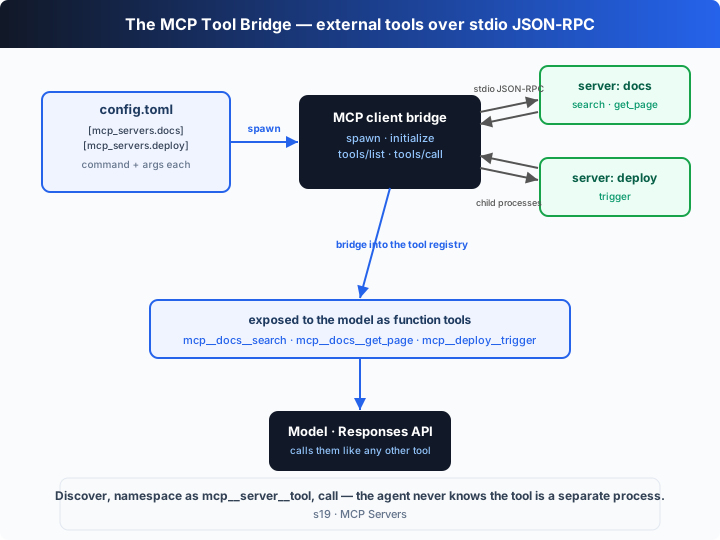
Declare a server under [mcp_servers.<name>] in ~/.codex/config.toml (command + args). The harness spawns each server as a child process and reads/writes JSON-RPC 2.0 line-by-line over stdio: first an initialize handshake, then tools/list to discover what tools it offers, then it bridges each one into an ordinary Responses API function tool named mcp__<server>__<tool>. The model calls it like any other tool, and behind the scenes the harness translates that call into a tools/call to the child process.
| concept | meaning |
|---|---|
[mcp_servers.<name>] | declares a server in config.toml: command + args (+ optional env) |
| stdio JSON-RPC | the harness spawns the server as a child process and exchanges JSON-RPC 2.0 messages line-by-line |
initialize / tools/list | handshake + discover which tools the server offers |
tools/call | actually invoke one of the tools |
mcp__<server>__<tool> | the bridged tool name: a namespace to prevent collisions, and the name the model sees |
How It Works
Four pieces: the config declaration, spawning a child process and speaking JSON-RPC, the handshake + discovery, and bridging into the tool registry.
Step 1: what does a server look like? Just a config entry saying "which command starts it". This is exactly the shape of an [mcp_servers.*] table in ~/.codex/config.toml.
const MCP_CONFIG: Record<string, { command: string; args: string[] }> = {
  docs:   { command: NODE, args: ["--import", "tsx", SELF, "--mcp-server", "docs"] },
  deploy: { command: NODE, args: ["--import", "tsx", SELF, "--mcp-server", "deploy"] },
};
Step 2: spawn the server as a child process and exchange JSON-RPC line-by-line over its stdin/stdout. The server side does just three things: answer initialize, report tools/list, and execute tools/call (protocol goes to stdout, logs to stderr — never mixed).
async function connectMcp(name: string): Promise<McpClient> {
  const def = MCP_CONFIG[name];
  const child = spawn(def.command, def.args, { stdio: ["pipe", "pipe", "pipe"] });
  const client = new McpClient(name, child);
  await client.connect();                 // initialize handshake + tools/list discovery
  return client;
}
Step 3: handshake and discovery. initialize exchanges the protocol version and both sides' capabilities, then tools/list returns every tool definition the server exposes.
async connect(): Promise<void> {
  await this.request("initialize", { protocolVersion: "2024-11-05", clientInfo: { name: "learn-codex", version: "0.1.0" }, capabilities: {} });
  this.child.stdin!.write(JSON.stringify({ jsonrpc: "2.0", method: "notifications/initialized" }) + "\n");
  this.tools = (await this.request("tools/list")).tools as McpToolDef[];   // what tools were discovered
}
Step 4: bridge into the tool registry. Wrap each MCP tool as a Responses API function tool, prefixing the name with mcp__<server>__<tool> to prevent collisions; its handler just sends a tools/call to the child process.
function bridgeTools(client: McpClient): void {
  for (const t of client.tools) {
    register(
      fn(`mcp__${norm(client.name)}__${norm(t.name)}`, `(MCP:${client.name}) ${t.description}`, t.inputSchema),
      (args) => client.callTool(t.name, args)   // a model call becomes a tools/call to the child
    );
  }
}
And the agentLoop driving all of this is unchanged since s01: it just sees a few more function tools in the registry, and keeps calling the model, dispatching tools and feeding results back as usual. It doesn't know — and doesn't need to know — that behind those tools are external processes.
The core insight: MCP is a "process ↔ tool" translation bridge. Facing down, it speaks JSON-RPC to the child process (initialize / tools/list / tools/call); facing up, it presents the discovered tools to the model in the shape of ordinary function tools. The model sees a function called mcp__docs__search; when it calls, the bridge crosses into another process on its behalf, fetches the result, and feeds it back into the loop. So "adding a capability to the agent" goes from "edit the harness source" to "add one line of config" — regardless of what language the service is written in, or whether it's third-party at all.
Try It
Teaching demo note: the code spawns two child processes (itself, with a
--mcp-serverflag) speaking real stdio JSON-RPC — purely local, no network, no key, and it never touches your project files.
No API key needed: this chapter is a self-running demo with no REPL. Without OPENAI_API_KEY it uses a built-in offline scripted model — it calls three bridged tools in sequence: query the knowledge base (docs.search, docs.get_page, annotated readOnly) and trigger a deploy (deploy.trigger, annotated destructive), printing the JSON-RPC traffic throughout.
Setup (first run):
npm install
cp .env.example .env        # fill in OPENAI_API_KEY and MODEL_ID to run the real model
Run:
npx tsx s19_mcp_servers/code.ts                # offline demo model
OPENAI_API_KEY=sk-... npx tsx s19_mcp_servers/code.ts   # real model
Try these tweaks:
- Add another tool to
SERVERS.docs.toolsandhandlers(saylist_pages), re-run, and watchtools/listdiscover it. - Run with a real key and watch the model pick
mcp__*tools on its own to answer the same question. - Remove the
mcp__deploy__triggercall from the offline script and ask something unrelated to deploys — feel why a(destructive)tool should go through approval (back to s03).
Watch for: does every tool name carry the mcp__<server>__ prefix? Are the three steps initialize → tools/list → tools/call clearly visible in the log? When the model calls mcp__docs__search, is that backed by a JSON-RPC tools/call to the docs child process?
What's Next
At this point the agent can plug in any external tool through one standard protocol. But look back: the first 19 chapters each added one mechanism, scattered across 19 demos running separately — a real harness doesn't work that way.
The tool registry, approval, sandbox, planning, memory, sub-agents, the task board, worktrees, MCP… these are meant to hang off the same loop and work together.
s20 Full Harness → wire every mechanism so far back into one complete harness and run a narrated trace. Many mechanisms, one loop.
Into the Codex source
The following is based on the public MCP protocol, with reference to the overall structure of OpenAI's open-source
openai/codexrepo (codex-rs). The chapter's "declare → spawn → bridge" is the minimal skeleton of an MCP client; real implementations make connection management, naming and gating production-grade.
The chapter's McpClient ≈ the connection codex-rs maintains for each [mcp_servers] entry. The differences are connection lifecycle management and tool governance.
1. The config.toml declaration: the chapter matches the real shape
The chapter's MCP_CONFIG (command + args) is exactly the shape of an [mcp_servers.<name>] table in Codex's ~/.codex/config.toml. A real entry can also carry env (to inject environment variables), startup and call timeouts, and so on; on startup Codex spawns and supervises each configured child process one by one. The chapter drops env and timeouts to focus on the "declare it and it's connected" core.
2. Transports: stdio is the default, HTTP is the extension
The chapter uses only stdio — spawn the server as a child process and exchange JSON-RPC line-by-line. That's MCP's local default transport and how Codex talks to local servers. MCP also supports HTTP-based remote transports (to reach remote servers), and a real client maintains several local + remote connections at once in its connection manager. The chapter keeps only stdio because it's the most direct form of "turning an external process into a tool".
3. Handshake, discovery and namespacing
The chapter's initialize (exchanging protocolVersion and both sides' capabilities) → tools/list (discover tools) → tools/call (invoke) is MCP's standard three-step, the same one Codex walks when connecting to a server. After discovery, a real implementation aggregates tools from multiple servers into one tool namespace and uses a prefix (the chapter's mcp__<server>__<tool>) so identically-named tools from different servers don't collide — exactly the naming idea the chapter demonstrates.
4. Permission gating and "Codex as a server itself"
In a real system, MCP tool calls still fall under Codex's approval and sandbox policy — a tool annotated destructive (the chapter's deploy.trigger) can be held by approval_policy pending human confirmation (see s03). And Codex can not only consume MCP servers but also be served as one via codex mcp, letting other agents call Codex as a tool. The chapter only demonstrates the "consume" half, but the bridge's translation mechanism works on both sides.
In one line: MCP turns "add a capability to the agent" from "edit the source" into "add one line of config". With one child process, three JSON-RPC methods and an mcp__-prefix bridge, the chapter runs "declare → discover → call" end to end; real implementations just layer connection supervision, multi-server aggregation, HTTP transports and permission gating on top.