Tools Beyond the Shell
Codex in DepthSee, Search, and Drive a Browser
Codex's built-in tools go far past the shell — it can search the live web, read images, generate them, and operate a browser or desktop.
s01 → ... → s23 → s24 → s25 → s26 → ... → s28
"The registry holds far more than a shell" —— searching the web, seeing images, generating images, driving a browser, operating the desktop: all of them are tools registered into the same table.
Harness layer: Codex deep-dive — what changes is not the loop, but "what is actually inside the toolbox".
The Problem
Back in s02 we built a tool registry: dispatch by name, holding read_file, write_file, apply_patch, list_dir, shell — five tools, all revolving around "read a file / change a file / run a command". From s02 to s20, no matter what mechanism we added, what the model could do never escaped your workspace and that one shell.
But real tasks constantly need to cross the boundary of the workspace:
- "What's new in the latest TypeScript?" — the answer is on the web, not in your repo. The model can't just guess.
- "Rebuild the UI from this screenshot" — the input is an image; the model has to see it first.
- "Make a hero image for my release blog post" — the output is an image that has to be generated.
- "Open this page, click into the docs, copy down the API signature" — this needs to drive a real browser.
- "Drag that desktop window to the left and take a screenshot" — this needs to operate the whole GUI.
An agent with only a shell is powerless against all five. The question is: how do we hand these capabilities to the model without touching the s01 loop?
The Solution
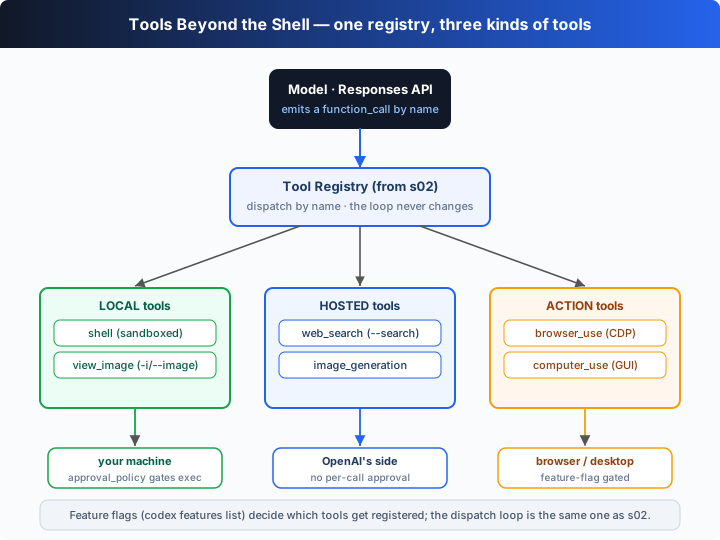
The answer is exactly the same as s02: still that one registry, still dispatch by name — we just register more tools into it. The key point: these new tools are not all "local functions that run on your machine". They come in three kinds:
| Kind | Tool | Where it really runs | Enabled by |
|---|---|---|---|
| local | shell | your machine (inside the sandbox) | gated by approval_policy (see s03/s04) |
| local | view_image | reads an image file in the workspace | -i/--image attaches images to the first prompt; the agent can re-open workspace images |
| hosted | web_search | OpenAI's side (native Responses tool) | the --search flag, no per-call approval |
| hosted | image_generation | OpenAI's side (gpt-image) | features.image_generation (stable) |
| action | browser_use | drives a real browser (over CDP) | features.browser_use (+_external/_full_cdp_access/in_app_browser) |
| action | computer_use | operates your desktop GUI | features.computer_use (stable) |
The three kinds of tools split the work like this:
- Hosted tools: the model emits the call, OpenAI executes it server-side, and the harness only threads the result back into the conversation.
web_searchandimage_generationare both like this — they consume nothing on your local machine. - Local tools: run by the harness on your machine, just like s02;
shellis constrained by approvals/sandbox, whileview_imagesimply reads an image in so the multimodal model can see it. - Action tools: the harness itself drives an external target — a browser (via the Chrome DevTools Protocol) or the whole desktop (screenshot → model reasons → keyboard/mouse events, in a loop).
Which tools get registered is decided by feature flags. Verify with the real local CLI (codex features list, v0.144.6):
| feature flag | stage | default | controls |
|---|---|---|---|
browser_use | stable | on | the browser-driving tool |
browser_use_external | stable | on | connect to an external browser |
browser_use_full_cdp_access | stable | on | open up full CDP access |
in_app_browser | stable | on | the in-app browser |
computer_use | stable | on | the desktop-GUI tool |
image_generation | stable | on | the image-generation tool |
standalone_web_search | under development | off | standalone web search (in development — don't treat it as stable) |
web_search_cached / web_search_request | deprecated | off | the old web-search toggles, deprecated |
search_tool | removed | off | removed |
How to toggle them (real commands): codex features enable <name> / codex features disable <name> writes into config.toml; or a one-shot -c features.<name>=true, --enable <FEATURE> / --disable <FEATURE>.
How It Works
Let's translate the "extended tool registry" into TypeScript, step by step:
Step 1: add metadata to s02's registry. Beyond name → handler, record each tool's kind (local / hosted / action), what gates it, and what it does in real Codex. The dispatch loop never reads these fields — they're for the harness (and this chapter's narration), just as the real CLI uses feature flags to decide "which tools to register".
interface ToolSpec {
  kind: "local" | "hosted" | "action";
  gatedBy: string;      // the real flag / feature that turns this tool on
  note: string;         // what the real Codex tool actually does
  description: string;  // model-facing description
  parameters: Record<string, unknown>;
  run: (args: Record<string, unknown>) => string; // teaching-model executor
}
Step 2: register a hosted tool. web_search's model-facing description looks like any other function tool, but the note tells the truth — it executes on OpenAI's side, is enabled by --search, and carries no per-call approval.
reg.register("web_search", {
  kind: "hosted",
  gatedBy: "--search (live web search, no per-call approval)",
  note: "the native Responses `web_search` tool — OpenAI runs the search server-side.",
  description: "Search the live web and return summarized results with citations.",
  parameters: { type: "object", properties: { query: { type: "string" } }, required: ["query"], additionalProperties: false },
  run: ({ query }) => `[simulated web results for "${query}"] …`,
});
Step 3: register an action tool. browser_use's run doesn't execute a command — in real Codex it drives a browser over CDP; the teaching version returns a simulated result.
reg.register("browser_use", {
  kind: "action",
  gatedBy: "features.browser_use (+_external, _full_cdp_access, in_app_browser)",
  note: "drives a real browser over the Chrome DevTools Protocol: navigate, click, read the DOM.",
  // …navigate/click/read → a simulated page snapshot
});
Step 4: the dispatch logic is character-for-character identical to s02. The registry finds the tool by name, calls its run, and threads the result back as a function_call_output. The narration just prints the metadata along the way so you can see "where this tool really runs".
dispatch(name: string, argsJson: string): string {
  const t = this.tools.get(name);
  if (!t) return `Error: unknown tool ${name}`;
  const args = JSON.parse(argsJson || "{}");
  console.log(`⚙ ${name} [${t.kind} · gated by ${t.gatedBy}]`); // narration
  return t.run(args);
}
The core insight: the s01 loop and s02's "dispatch by name" are completely untouched. What's new is only that the registry has more entries, and an entry's "place of execution" is no longer only your machine — some run on OpenAI's side (hosted), some drive an external target (action). To the model they all look identical: a function tool with a name and JSON parameters. In the offline demo you'll watch the model call web_search → view_image → browser_use → image_generation → computer_use in sequence, never once touching the shell.
Try It
Teaching-demo note: this chapter creates a real 1×1 PNG (
screenshot.png) in the system temp directory forview_imageto open, and hasimage_generationsimulate writing out ahero.png. Everything happens in the temp directory — it never touches your project.
Runs without an API key: offline, a scripted model calls each built-in tool in a fixed order, with narration noting "where it really runs, and what turns it on".
Setup (first run):
npm install
cp .env.example .env        # fill in OPENAI_API_KEY and MODEL_ID to run the real model
Run:
npx tsx s25_builtin_tools/code.ts                       # offline demo
OPENAI_API_KEY=sk-... npx tsx s25_builtin_tools/code.ts # real model (same registry)
Try these experiments:
- Just run it, and read the "registry listing" printed at the top: each tool's
kind(local/hosted/action) and gate (--search,-i/--image,features.*). - Watch the model's five tool calls — note that
web_searchandimage_generationare labeledhosted(run on OpenAI's side),browser_use/computer_useare labeledaction(drive the browser/desktop), andview_imageis labeledlocal. - Run once with a real key: these tools are still exposed to the model as function tools, dispatched by the same registry — the teaching model only swaps the "real execution" for a simulation.
What to watch: did the loop, or s02's dispatch function, change by a single line because of these new tools? How do "many tools" and "a very simple loop" hold true at the same time?
What's Next
The toolbox is clear now — but hosted/action tools like web_search and image_generation all depend on OpenAI's server side. What if your model isn't on OpenAI's side at all? Many people want to point Codex at local models (ollama, lmstudio) or a custom provider, running open-source models with --oss.
s26 Local Models & Custom Providers → unpack --oss, --local-provider, model_providers, and wire_api, and see how the harness turns "the model backend" into yet another replaceable knob.
Into the Codex source
The following is based on the overall architecture of OpenAI's open-source
openai/codexrepo (codex-rs, the Rust implementation), the official docs, and the real--helpandcodex features listoutput of the locally installedcodexCLI (v0.144.6). The teaching version's "registry with metadata" is the minimal skeleton of this multimodal/action tool surface.
The teaching ToolRegistry ≈ real Codex's tool assembly (tool specs + feature gates). Each item below is an expansion on top of that core.
1. web_search is a hosted Responses tool, not a local function
The teaching version registers web_search as an ordinary function tool, but the note and kind: "hosted" already point out the truth: in real Codex it is a server-side hosted tool of the Responses API — the model emits a web_search call, OpenAI performs the retrieval on the backend and streams back cited results, and the harness runs no search code locally at all. The real help text for the --search flag (v0.144.6) says it plainly: "Enable live web search. When enabled, the native Responses web_search tool is available to the model (no per-call approval)" — "no per-call approval" precisely because it produces no local side effects. You can also see a web_search-typed item in the codex exec --json event stream (see s23).
2. Image input is multimodal; view_image lets the agent look at images proactively
The real CLI's -i, --image <FILE>... (help text: "Optional image(s) to attach to the initial prompt") attaches images as multimodal input to the first prompt. On top of that, the agent can use a tool like view_image to proactively open an image in the workspace mid-session for the model to see. The teaching version uses one view_image tool to represent both paths (attaching via -i + viewing mid-session); in essence both are "read the image bytes in as the model's visual input".
3. image_generation / browser_use / computer_use are assembled via feature flags
codex features list (v0.144.6) shows these tools are controlled by stable feature flags: image_generation, browser_use, browser_use_external, browser_use_full_cdp_access, in_app_browser, computer_use are all stable and on by default. This confirms the teaching design — the registry decides "which tools to register" at startup based on feature flags. In the real implementation browser_use drives a real browser over CDP (the Chrome DevTools Protocol); computer_use runs the desktop-operation loop of "screenshot → model reasons → keyboard/mouse events". By contrast, standalone_web_search is still under development, web_search_cached/web_search_request are deprecated, and search_tool is removed — this chapter labels all of these honestly in the table; don't treat in-development/deprecated features as stable.
4. The toggle mechanism: codex features + -c / --enable
There are three real entry points for toggling these tools, all given in the teaching version's table: codex features enable|disable <name> (writes features.<name>=true/false into ~/.codex/config.toml); a one-shot command-line override -c features.<name>=true; and the repeatable --enable <FEATURE> / --disable <FEATURE> (equivalent to -c features.<name>=true/false). This "flag → config → tool assembly" chain matches the config precedence covered in s22.
In one sentence: the built-in tool surface is not "more shell" — it is the same registry with three new places of execution — your machine (constrained by approvals/sandbox), OpenAI's side (hosted, no local side effects), and external targets (browser/desktop, an action loop). Almost all of the real implementation's complexity lives in "where these tools really run and how they get assembled by feature flags", not in the dispatch logic — which hasn't changed since s02.