Memory & Sessions
Memory ManagementDon't Lose the Details
Session rollouts let codex resume survive restarts; some facts should outlive summarization.
s01 → ... → s08 → s09 → s10 → s11 → ... → s20
"Write every turn to disk, and a session never really ends" — every turn hits disk, so the session outlives the process: it can be resumed, forked, archived, deleted.
Harness layer: memory — persistent state across processes and sessions.
The Problem
From s01 to s08, the thread lives only in memory. Close the process or the terminal, and the whole session is gone.
That causes two real headaches. First: you ask the agent to do a long-running piece of work and want to shut it down and pick it up tomorrow — you can't, because the memory dies with the process. Second: halfway through, you want to review "what exactly did it do, which files did it touch" — and there's no record to look at.
And once a session can be saved, a new problem appears immediately: sessions pile up. You want to pick up the last one where you left off (resume); you want to branch off from some intermediate state to try a different idea without disturbing the original (fork); after accumulating dozens, you want to tuck away the ones you rarely use and later bring them back (archive / unarchive), and delete the truly useless ones (delete).
The model has no persistent state of its own; all "memory" lives in the context, the context lives in memory, and memory dies with the process. The problem isn't that the model forgets — it's that the harness never wrote the session anywhere that outlives the process and can be managed there.
The Solution
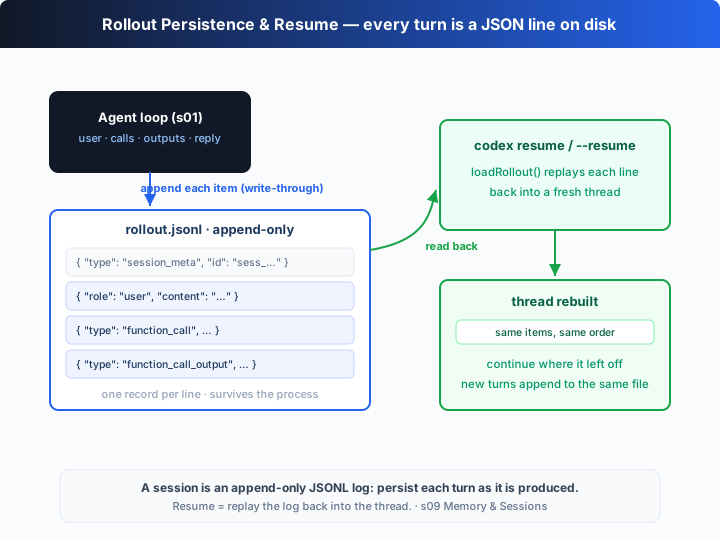
Write the session as an append-only JSONL log: every time a new item is produced (user message, tool call, tool output, final reply), serialize it to a line and append it to rollout-<id>.jsonl. The process can die at any moment; the log on disk survives — and a whole session lifecycle is built on top of that log.
| concept | role | teaching implementation |
|---|---|---|
rollout-<id>.jsonl | one session's append-only log | one JSON item per line |
session_meta | the log header | first line records id / cwd / start time (plus forked_from on a fork) |
| write-through | when to persist | append the moment an item is produced, not at turn end |
| session store | where sessions live | one file per session under ~/.codex/sessions/ |
Around this log, Codex provides a set of lifecycle subcommands (real CLI, verified on v0.144.6):
| command | what it does | key flags |
|---|---|---|
codex resume [SESSION_ID] [PROMPT] | rebuild the thread and continue (picker by default) | --last most recent · --all ignore cwd and list everything · --include-non-interactive |
codex fork [SESSION_ID] [PROMPT] | copy a session into a new one and continue from it | --last fork most recent · --all |
codex archive <SESSION> | tuck a session away, hiding it from the default picker | SESSION is a UUID or session name |
codex unarchive <SESSION> | bring back an archived session | same as above |
codex delete <SESSION> | permanently delete a session | --force no prompt (requires a UUID) |
For resume and fork, omitting SESSION_ID opens a picker (filtered by the current cwd; --all disables the filter and shows a CWD column); archive / unarchive / delete require you to name a session.
Two key designs. First, write-through — an item is persisted the instant it's produced, so the on-disk record is complete to the last moment no matter when the process crashes. Second, fork is a copy, not a move — the branched copy gets a brand-new id and header (recording forked_from), leaving the original untouched, so one history can grow several independent branches.
How It Works
Translate this lifecycle into TypeScript, step by step:
Step 1: store sessions as a directory — one rollout-<id>.jsonl per session; archiving means moving it into an archived/ subdirectory.
const SESSIONS_DIR = process.env.CODEX_SESSIONS ?? join(tmpdir(), "learn-codex-s09", "sessions");
const ARCHIVE_DIR = join(SESSIONS_DIR, "archived");
const rolloutPath = (id: string) => join(SESSIONS_DIR, `rollout-${id}.jsonl`);
const archivedPath = (id: string) => join(ARCHIVE_DIR, `rollout-${id}.jsonl`);
Step 2: a new session writes its header (session_meta); each item is written through as a line the moment it's produced.
function startRollout(id: string, forkedFrom?: string): string {
  mkdirSync(SESSIONS_DIR, { recursive: true });
  const meta = { type: "session_meta", id, cwd: CWD,
    started: new Date().toISOString(), ...(forkedFrom ? { forked_from: forkedFrom } : {}) };
  writeFileSync(rolloutPath(id), JSON.stringify(meta) + "\n"); // truncate: brand-new session
  return rolloutPath(id);
}
function appendRollout(path: string, items: unknown[]): void {
  if (items.length === 0) return;
  appendFileSync(path, items.map((i) => JSON.stringify(i)).join("\n") + "\n"); // write-through
}
Step 3: resume — read every line back, skip session_meta, replay into a thread, and continue where you stopped.
function loadRollout(path: string): unknown[] {
  if (!existsSync(path)) return [];
  return readFileSync(path, "utf8")
    .split("\n").filter((l) => l.trim())
    .map((l) => JSON.parse(l))
    .filter((r) => r.type !== "session_meta"); // rebuild the exact history thread
}
Step 4: fork — read the full history, write a file under a new id: the new header records forked_from; the original is untouched.
function forkSession(srcId: string): string {
  const history = loadRollout(rolloutPath(srcId)); // all items (meta already skipped)
  const id = newId();
  startRollout(id, srcId);                  // new header records the parent
  appendRollout(rolloutPath(id), history);  // then copy the whole history
  return id;
}
Step 5: archive / unarchive / delete — just moves and removals against this directory.
function archiveSession(id: string)   { mkdirSync(ARCHIVE_DIR, { recursive: true });
  if (existsSync(rolloutPath(id))) renameSync(rolloutPath(id), archivedPath(id)); } // hide it
function unarchiveSession(id: string) { if (existsSync(archivedPath(id))) renameSync(archivedPath(id), rolloutPath(id)); }
function deleteSession(id: string)    { rmSync(rolloutPath(id), { force: true }); rmSync(archivedPath(id), { force: true }); }
Step 6: the picker lists the "visible" sessions — read each file's session_meta, skipping archived ones.
function listSessions(includeArchived = false): SessionMeta[] {
  const dirs = includeArchived ? [SESSIONS_DIR, ARCHIVE_DIR] : [SESSIONS_DIR];
  // …read the first-line session_meta of each rollout-*.jsonl, sorted by started
}
Core insight: the whole lifecycle never changes the agent's shape — the loop is the same loop, the tools are the same tools. It only mirrors "the in-memory thread array" onto "an append-only log on disk", then defines five operations on that log: resume = replay and continue; fork = copy under a new id; archive / unarchive = move into / out of a hidden directory; delete = remove the file. Because every item is persisted the instant it's produced, a dead process loses nothing; because fork is a copy, branches stay independent; because archiving is just a move, nothing is lost. The offline demo walks all five operations, printing the picker's "visible / archived" counts as it goes.
Try It
Teaching demo note: this chapter really writes files — it creates, copies, moves, and deletes several
rollout-*.jsonlfiles in the session store (the system temp dir by default; override withCODEX_SESSIONS), and runs the model'sechocommands.
No API key needed: without OPENAI_API_KEY, the chapter is a self-running, narrated demo that walks the full lifecycle — new session → resume → fork → list → archive → unarchive → delete — with no input required.
Setup (first run):
npm install
cp .env.example .env        # fill in OPENAI_API_KEY and MODEL_ID to run the real model
Run:
npx tsx s09_memory_sessions/code.ts                 # narrated lifecycle demo
npx tsx s09_memory_sessions/code.ts --resume        # actually resume the most recent session
CODEX_SESSIONS=./.codex/sessions npx tsx s09_memory_sessions/code.ts  # store in the project
Try these experiments:
- Run it and watch step 3
[fork] A → B: B gets a new id but an identical history (forked_fromis recorded in its new header). - Watch steps 5–6: after archive, A vanishes from the picker and the archived count goes up by one; after unarchive it comes back — nothing was deleted.
- Immediately run
npx tsx s09_memory_sessions/code.ts --resumeand watch it replay the most recent session from disk before continuing.
Watch for: at step 4 the picker lists 2 sessions (the original + the fork); after delete at step 7 only 1 remains. None of these five operations ever touched the agent loop — they are all create/move/delete/query against the log on disk.
What's Next
Memory now survives across sessions, and can be forked and archived. But the system prompt is still s01's one hardcoded string: switching projects means rewriting it, adding a capability means hand-editing it, and every request carries the full text. It should be assembled at runtime, in layers, like configuration.
s10 Instructions → built-in base + project AGENTS.md + a config.toml profile, assembled at runtime into the system prompt, the model, and the reasoning effort.
Into the Codex source
The following is based on the overall structure of OpenAI's open-source
openai/codexrepo (codex-rs, written in Rust) and on the real--helpoutput of the localcodexCLI (v0.144.6) subcommands. The chapter's "write-through log + a set of create/move/delete operations on the directory" is the minimal skeleton of Codex's session persistence (rollout) and lifecycle subcommands; every difference is engineering detail about record granularity and resume entry points.
The chapter's loadRollout / forkSession / archiveSession / deleteSession ≈ the real codex resume|fork|archive|unarchive|delete. Each item below expands on that core.
1. The real path: rollout files under ~/.codex/sessions
The chapter writes the log to the system temp dir. Codex persists each session's rollout under $CODEX_HOME (default ~/.codex), in a sessions/ directory layered by date, with filenames roughly like rollout-<timestamp>-<id>.jsonl. Many past sessions coexist on one machine, which is what lets codex resume / codex fork list them for you to pick. The chapter uses a single flat directory so the "append → replay → copy → move" chain stays obvious.
2. The resume / fork picker and its filtering
When SESSION_ID is omitted, the real codex resume and codex fork open an interactive picker, filtered by the current working directory by default; --all disables the filter and adds a CWD column; --last selects the most recent session and skips the picker; codex resume additionally has --include-non-interactive, which also lists non-interactive sessions such as codex exec runs. Both accept an optional [PROMPT] as the first message after resuming / forking. The chapter's --resume mimics --last by picking the most recent session.
3. fork means "copy into a new session"
codex fork copies a saved session into a new one — the history comes along, but it gets a brand-new session id and evolves independently from then on. This corresponds to the chapter's forkSession: read the full history → write a header under a new id (the chapter also records forked_from) → copy every item. It's ideal for "branch off from some intermediate state to try a different idea without disturbing the original".
4. archive / unarchive / delete: managing the backlog
Once sessions pile up, they need managing. codex archive <SESSION> tucks a session away — hidden from the default picker but not deleted; codex unarchive <SESSION> brings it back; codex delete <SESSION> is the permanent removal (--force skips confirmation and requires SESSION to be a UUID). For all three, SESSION may be a UUID or a session name (a value that parses as a UUID is treated as one). The chapter models "hidden but not deleted" by moving files into / out of an archived/ subdirectory, and models deletion with rmSync.
5. Why append-only JSONL
Both the chapter and Codex choose an "append-only, one JSON object per line" format for solid reasons: crash safety (already-written lines aren't corrupted by a mid-write exit), cheap writes (appending a line is O(1)), human-friendliness (you can cat / tail it to audit every step), and it is a natural artifact for "copying out a branch, replaying it wholesale, or handing it to other tools". The leading session_meta line (id, cwd, model and configuration, and so on) lets resume rebuild the thread exactly, instead of re-interpreting a blob of text.
In one line: Codex's session persistence is, at its core, the chapter's "append one line per item → replay to recover". The five lifecycle subcommands resume / fork / archive / unarchive / delete are all just "create, delete, move, query, copy" against that append-only log on disk — none of them requires touching the agent loop. Internalize "write-through + replay = a resumable session" first, then see through "lifecycle = file operations on the log"; the rest is engineering hardening.