config.toml in Depth
Codex in DepthEvery Knob, One Resolver
model_providers, wire_api, sandbox_workspace_write, profiles and mcp_servers all resolve through one precedence chain.
s01 → ... → s20 → s21 → s22 → s23
"Every knob, one resolver" — every switch lives in a single file; one resolver walks a fixed precedence chain to turn them into the config that actually takes effect.
Harness layer: Codex deep dive — in the real Codex product,
~/.codex/config.tomlis the single configuration entry point.
The Problem
In Part I, configuration was either hardcoded in the source (s01–s09) or a small CONFIG object literal (s10). That's a teaching skeleton. Real Codex juggles dozens of switches, and they interact. Three real pain points:
- You don't know which switches exist or what their keys are called — you want to point Codex at a company gateway, add a writable directory to the sandbox, register an MCP server, exempt a project from approval… where does each of these live, and what's the exact key name? Scattered knowledge is unusable.
- The same key can be set in several places —
modelcan come from a built-in default, theconfig.tomlroot, a--profile, or the command line's-c key=value/--model. When the behavior surprises you, which layer won? - Profiles / providers / trust compose — a
--profilecan switch your provider to a gateway and flip the sandbox todanger-full-access; a[projects."/path"]can mark a whole project as trusted. Stacked together, they spiral out of control without a global mental model.
The problem isn't "too many switches" — it's treating them as "a pile of loose settings." It's actually one schema + one resolver: the file enumerates everything you can configure, and the resolver walks a fixed precedence chain to produce "the one config that takes effect." Understand that chain and you understand the whole thing.
The Solution
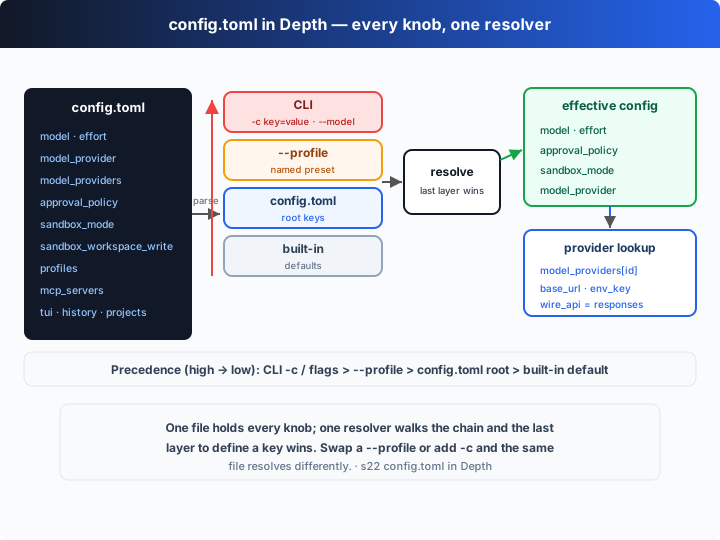
One file, ~/.codex/config.toml, holds every switch; one function, resolveConfig, walks a fixed precedence chain to resolve it. First get the schema by area (this chapter's reference tables), then look at the chain.
Model & providers (point at the default API, or any compatible gateway):
| Key | Values / default | Meaning |
|---|---|---|
model | "gpt-5-codex" | which model to use |
model_reasoning_effort | minimal/low/medium/high/xhigh | reasoning effort (Responses API; xhigh is model-dependent) |
model_provider | "openai" | points at an id in model_providers |
model_providers.<id>.name | display name | provider name |
model_providers.<id>.base_url | URL | API base URL (gateway / self-hosted) |
model_providers.<id>.env_key | env var name | which env var holds this provider's key |
model_providers.<id>.wire_api | responses | wire protocol; current Codex speaks only responses (chat was removed — see the source notes below) |
...http_headers / env_http_headers / query_params | map | extra static headers / headers from env vars / query params |
...request_max_retries / stream_max_retries / stream_idle_timeout_ms | 4 / 5 / 300000 | request retries, stream retries, stream idle timeout |
Approval & sandbox (the first safety gate — s03/s04):
| Key | Values / default | Meaning |
|---|---|---|
approval_policy | untrusted/on-request/never, or { granular = {...} } | when to pause and ask a human; default on-request (on-failure is now an alias for it) |
sandbox_mode | read-only/workspace-write/danger-full-access | filesystem & network isolation; default read-only |
sandbox_workspace_write.network_access | false | allow outbound network under workspace-write |
sandbox_workspace_write.writable_roots | [paths] | extra writable directories beyond the workspace |
sandbox_workspace_write.exclude_tmpdir_env_var / exclude_slash_tmp | bool | exclude $TMPDIR / /tmp from the default writable roots |
Presets, external tools, UI, history, project trust:
| Key | Values / default | Meaning |
|---|---|---|
profiles.<name> | table | named preset; when selected with --profile <name> it overrides the same-named root keys |
mcp_servers.<id>.command / args / env | stdio | launch a stdio MCP server (see s19) |
mcp_servers.<id>.url (+ bearer_token_env_var) | streamable HTTP | or connect to an HTTP MCP server |
mcp_servers.<id>.startup_timeout_sec / tool_timeout_sec / enabled | 10 / 60 / true | startup timeout, per-tool timeout, enabled |
tui.alternate_screen / animations / notifications / notification_method | auto/true/… | TUI terminal behavior |
history.persistence / max_bytes | save-all/none | whether to write sessions to history.jsonl, and its size cap |
projects.<path>.trust_level | trusted/untrusted | mark a project/worktree as trusted |
The precedence chain (higher overrides lower) — the heart of this chapter:
| Precedence | Source | Example |
|---|---|---|
| highest | CLI -c key=value / flags | -c sandbox_mode=read-only, --model, --profile |
| high | --profile NAME | --profile deep |
| low | config.toml root | model = "gpt-5-codex" |
| lowest | built-in default | approval_policy="on-request", sandbox_mode="read-only" |
The key design: schema and resolution are two separate things. The file enumerates "what can be configured"; the resolver asks just one question — for each key, which layer defined it last, and that layer wins.
How It Works
Translate this into TypeScript, step by step (full version in code.ts).
Step 1: a TOML-subset parser. Real Codex uses a full TOML crate; we only need the subset config files actually use — scalars, strings, arrays, inline tables, and [dotted.table] headers (quoted segments allowed, because project paths contain . and /). The core is parseValue:
function parseValue(raw: string): TomlValue {
  const s = raw.trim();
  if (s.startsWith('"') || s.startsWith("'")) return s.slice(1, -1);
  if (s === "true") return true;
  if (s === "false") return false;
  if (s.startsWith("[") && s.endsWith("]")) return splitTop(s.slice(1, -1), ",").map(parseValue);
  if (s.startsWith("{") && s.endsWith("}")) {
    const t: TomlTable = {};
    for (const pair of splitTop(s.slice(1, -1), ",")) {
      const eq = pair.indexOf("=");
      t[parseKey(pair.slice(0, eq))] = parseValue(pair.slice(eq + 1));
    }
    return t;
  }
  if (s !== "" && !Number.isNaN(Number(s))) return Number(s);
  return s; // lenient: a bare word (e.g. a `-c effort=high` value) becomes a string
}
splitTop splits "only at nesting depth 0 and outside strings" — so a quoted segment with dots like [projects."/work/learn-codex"] isn't wrongly split apart.
Step 2: the built-in default layer. Note these are codex-rs's real defaults (approval_policy defaults to on-request, sandbox_mode to read-only, provider to the built-in openai):
const DEFAULTS: TomlTable = {
  model: "gpt-5-codex",
  model_reasoning_effort: "medium",
  model_provider: "openai",
  approval_policy: "on-request",
  sandbox_mode: "read-only",
};
Step 3: trace — walk the chain; the last layer to define the key wins, and we record which layer that was:
function trace(key: string, layers: Layer[]): { value: TomlValue; source: string } {
  let value: TomlValue = "(unset)", source = "(none)";
  for (const { label, table } of layers)
    if (Object.prototype.hasOwnProperty.call(table, key)) { value = table[key]; source = label; }
  return { value, source };
}
Step 4: resolveConfig orders the four layers low-to-high and traces each key:
const layers: Layer[] = [
  { label: "built-in default", table: DEFAULTS },
  { label: "config.toml root", table: cfg },
  { label: `--profile ${opts.profile}`, table: chosen ?? {} },
  { label: "CLI -c / flags", table: opts.cli ?? {} },
];
const entries: Resolved["entries"] = {};
for (const k of SCALAR_KEYS) entries[k] = trace(k, layers);
Step 5: the scalar model_provider is just an id; resolve it to a concrete endpoint (base_url, env_key, wire_api):
function resolveProvider(cfg: TomlTable, id: string) {
  const providers = (cfg.model_providers ?? {}) as TomlTable;
  if (id === "openai" && !providers[id])
    return { name: "OpenAI", base_url: "https://api.openai.com/v1", env_key: "OPENAI_API_KEY", wire_api: "responses" };
  const p = (providers[id] ?? {}) as TomlTable;
  return {
    name: String(p.name ?? id), base_url: String(p.base_url ?? "?"),
    env_key: String(p.env_key ?? "?"), wire_api: String(p.wire_api ?? "responses"),
  };
}
Core insight: the offline demo resolves the same embedded config.toml under three flag/profile combos and prints which layer each key came from. Look at scenario ③ (--profile deep plus two -c overrides):
model                  = gpt-5-pro        ← --profile deep
model_reasoning_effort = low              ← CLI -c / flags
model_provider         = gateway          ← --profile deep
approval_policy        = on-request       ← config.toml root
sandbox_mode           = read-only        ← CLI -c / flags
provider[gateway] → Corp Gateway · https://llm.corp.example/v1 · key=$GATEWAY_API_KEY · wire_api=responses
model/provider were rewritten by the profile, effort/sandbox were beaten down by -c over the profile, and approval was untouched so it fell back to the file root — the same file resolving into three different "effective configs" because of the precedence chain. That is "every knob, one resolver."
Try It
Teaching demo note: this chapter parses a teaching
config.tomlembedded incode.ts— it does not read your real~/.codex/config.tomland writes no files. Safe to run.
No API key needed: without OPENAI_API_KEY, the demo prints each key's value and source layer across three scenarios, and the final "Your turn" block tells you what request it would send with the resolved model/effort/provider. Set a key and it actually fires one Responses API call with the resolved values — the transport changes, the resolution doesn't.
Setup (first run):
npm install
cp .env.example .env        # fill in OPENAI_API_KEY to run the real model
Run:
npx tsx s22_config_toml/code.ts                                  # narrated three-scenario demo
npx tsx s22_config_toml/code.ts --profile deep                   # use the deep preset (switches to the gateway provider)
npx tsx s22_config_toml/code.ts --profile fast --model gpt-5-mini -c model_reasoning_effort=high
OPENAI_API_KEY=sk-... npx tsx s22_config_toml/code.ts --profile deep   # real API tail
Try these experiments:
- Run it directly and compare scenario ① (everything from the file root) with scenario ② (
--profile fastchangeseffortandapprovalto the profile's values), reading the source layer annotated after←on each line. - Run
--profile deepand watch theprovider[gateway]line switch the base_url tohttps://llm.corp.example/v1and the env_key toGATEWAY_API_KEY. - Stack your own
-c:-c sandbox_mode=read-only -c model_reasoning_effort=high, and watch those two keys' source layer change from--profiletoCLI -c / flagswhile the others stay put.
Watch for: which layer does the ← at the end of each key point to? When you pass both --profile and -c for the same key, who wins? That's exactly the chain at work.
What's Next
Config resolves, providers switch, precedence is clear. But all of this is still "running interactively on your machine." In the real world Codex also leaves your laptop: reviewing PRs with codex review, running unattended in CI with codex exec, and working tasks in parallel inside Codex Cloud worktrees.
s23 Review, CI & Cloud → the same loop, set loose on real, unattended work. It's also the closing chapter of Part II.
Into the Codex source
The following is based on OpenAI's open-source
openai/codexrepo (codex-rs, written in Rust). The chapter's "TOML-subset parse + resolve along a precedence chain" is the minimal skeleton of Codex's config system; the differences are all in the number of keys and the engineering details. Every key name, value, and default in this section was checked against the real source.
The chapter's parseToml + resolveConfig ≈ Codex's ConfigToml deserialization and config resolution. Each item below expands on — and verifies against — that core.
1. The real schema: codex-rs's ConfigToml
The real config structure is ConfigToml in codex-rs/config/src/config_toml.rs. Every key in the chapter's CONFIG_TOML maps onto it: model, model_provider, approval_policy, sandbox_mode, sandbox_workspace_write, mcp_servers, model_providers, profile / profiles, history, tui, model_reasoning_effort, projects. codex-rs uses serde to deserialize the whole TOML into a strongly-typed struct (most keys are Option<T>, falling back to built-in defaults when absent); the chapter uses a dynamic TomlTable instead — same shape, different type strictness.
2. wire_api: responses vs chat — and chat has been removed
wire_api selects the wire protocol a provider speaks. Historically there were two values: responses (OpenAI's native Responses API, /v1/responses) and chat (the older Chat Completions, /v1/chat/completions, used by many third-party gateways and local servers like Ollama). But in current codex-rs chat has been removed: the WireApi enum (codex-rs/model-provider-info/src/lib.rs) has only the Responses variant left, and setting wire_api = "chat" errors with "no longer supported", pointing to discussion #7782. In other words Codex now natively speaks only the Responses API — which is why this course has used Responses since s01. The chapter marking wire_api as responses reflects exactly this.
3. The real values of approval_policy and sandbox_mode
approval_policy (AskForApproval in codex-rs/protocol/src/protocol.rs): untrusted (internally UnlessTrusted, auto-approving only "known-safe" read-only commands), on-request (the #[default], letting the model decide when to ask; on-failure is now a serde(alias) for it), never, and the newer granular = {...} fine-grained table (toggling sandbox_approval / rules / skill_approval / etc. individually). sandbox_mode (SandboxPolicy): read-only, workspace-write, danger-full-access (the source also has external-sandbox, meaning the process is already inside an external sandbox). The workspace-write sub-keys are exactly the chapter's table: writable_roots, network_access (default false), exclude_tmpdir_env_var, exclude_slash_tmp.
4. profiles: which keys ConfigProfile can override
[profiles.<name>] corresponds to ConfigProfile in codex-rs/config/src/profile_toml.rs, and can override model, model_provider, approval_policy, sandbox_mode, model_reasoning_effort, model_reasoning_summary, model_verbosity, and more. When selected with --profile NAME, its values override the same-named keys at the config.toml root — exactly the chapter's "profile layer sits above the root layer." (Codex also supports putting a preset in a separate $CODEX_HOME/<name>.config.toml file; the mechanism is the same.)
5. Precedence and -c: the real resolution order
codex-rs's effective order matches the chapter: built-in default → config.toml root → selected profile → command-line overrides. On the command line, -c key=value (also written --config) is highest precedence, and it supports dotted keys (e.g. -c sandbox_workspace_write.network_access=true) and TOML value syntax; dedicated flags like --model and --profile are equivalent to top-level overrides of the corresponding keys. The chapter's -c parsing (walking dotted paths via parseHeader, lenient bare-word handling in parseValue) mimics exactly this behavior.
6. Provider network details and project trust
ModelProviderInfo also carries request_max_retries (default 4), stream_max_retries (default 5), stream_idle_timeout_ms (default 300000), http_headers, env_http_headers, query_params — the chapter only demonstrates name/base_url/env_key/wire_api. projects.<path>.trust_level marks a project/worktree trusted/untrusted; trusted projects also load a project-level .codex/config.toml, but project-level config cannot override machine-level provider, auth, or telemetry keys — trust has boundaries.
In one line: the core of Codex's config system is exactly the chapter's "one TOML schema enumerating every switch + one resolver walking the default < root < profile < CLI chain, with structured lookup for providers and trust." Every extra mechanism — serde strong typing, the responses-only wire_api, granular approval, provider retries/headers/query params, the boundaries of project trust — exists to keep that resolution flexible yet predictable across real multi-model, multi-gateway, multi-project use. Master "schema + one precedence chain" and the rest is engineering hardening.