The Codex CLI Surface
Codex in DepthOne Binary, Many Doors
codex exec/resume/review/login/mcp and the /slash commands are one dispatch layer over the same harness.
s01 → ... → s20 → s21 → s22 → s23
"One binary, many doors" — subcommands and slash commands are really just "different entrances into the same harness".
Harness layer: Codex in depth — what changes isn't the loop, it's which door you came in through.
The Problem
Throughout Part I (s01–s20) we built one loop. But the real Codex isn't a pile of scattered scripts — it puts that loop behind a single codex binary and gives you many doors:
- Want it interactive? Just type
codexand you're in the TUI. - Want a script to call it and exit when done?
codex exec "...". - Want to pick up where you left off?
codex resume --last. - Want it to review code?
codex review. - Want to manage login or MCP servers?
codex login,codex mcp.
Mid-session you also want to tweak settings on the fly: /model to switch models, /approvals to change the approval policy, /compact to squeeze the context, /status to check usage.
These entrances look different, but they shouldn't each rebuild an agent. The question: how do you design a dispatch layer so all these entrances converge on the single loop from s01?
The Solution
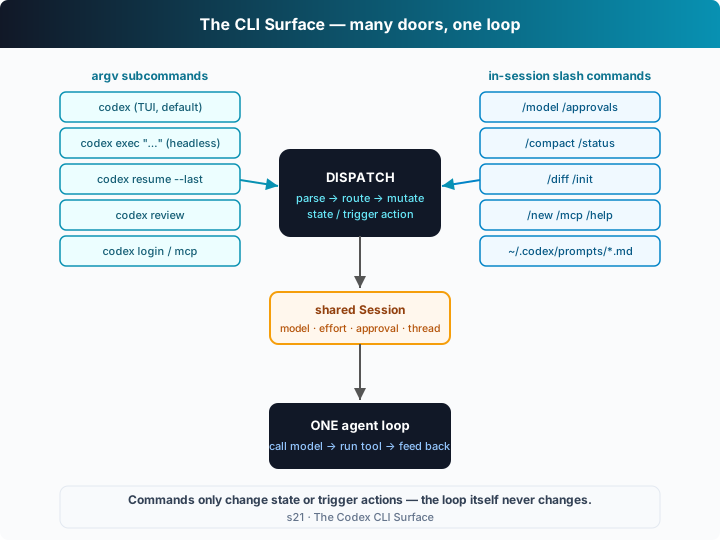
Add a dispatch layer: parse argv subcommands and /-prefixed slash commands, and route each one to a harness function. The loop itself doesn't change by a single line — dispatch only decides "which door you came in through".
argv subcommands (chosen once, on the way in):
| Command | Form | What it does |
|---|---|---|
codex | TUI (default) | interactive session, all slash commands available |
codex exec "..." | headless | run one task non-interactively, print and exit (see s23) |
codex resume [--last] | headless/TUI | reload a saved session and continue (s09's rollout) |
codex review [--base B] | headless | code review through the same loop (see s23) |
codex login [--device-auth] / logout | one-shot | ChatGPT browser sign-in / --with-api-key / headless device code |
codex mcp list|add|... | one-shot | manage MCP servers (s19) |
In-session slash commands (tweak any time): all go into a dispatch table; each handler mutates the shared Session or the harness and prints a result.
| Command | Effect |
|---|---|
/model <m> <effort> | switch the model and reasoning effort |
/approvals <policy> | set the approval_policy (newer Codex spells this /permissions; the old name still routes here) |
/compact | compact the conversation to free context |
/status | current config + token usage |
/diff | show the working-tree git diff |
/init | write an AGENTS.md scaffold into the workspace |
/new · /mcp · /help · /quit | new session · list MCP · help · quit |
The key design: slash commands and prompts share one entry point — a line of input starting with / goes to the dispatch table, otherwise it's fed to the loop as a prompt.
How It Works
Translate this dispatch layer into TypeScript, step by step:
Step 1: one Session state shared by every door — model, effort, approval, sandbox, working directory, conversation thread.
interface Session {
  model: string; effort: Effort; approval: Approval;
  sandbox: "read-only" | "workspace-write" | "danger-full-access";
  workspace: string; thread: unknown[]; mcpServers: string[];
}
Step 2: the slash-command dispatch table. Each handler takes the Session and args, mutates state, prints a result. /model just changes two fields:
const SLASH: Record<string, { desc: string; run: Handler }> = {
  "/model": { desc: "choose the active model and reasoning effort",
    run: (s, [m, e]) => {
      if (m) s.model = m;
      if (e && ["low","medium","high"].includes(e)) s.effort = e as Effort;
      console.log(`model → ${s.model}   effort → ${s.effort}`);
    } },
  // …/approvals /compact /status /diff /init /new /mcp /help…
};
SLASH["/permissions"] = SLASH["/approvals"]; // new name, same handler
Step 3: one in-session dispatch entry point. /... goes to the table, otherwise it's a prompt for the loop.
async function dispatch(s: Session, line: string): Promise<void> {
  if (line.startsWith("/")) {
    const [name, ...args] = line.split(/\s+/);
    const cmd = SLASH[name];
    return cmd ? cmd.run(s, args) : console.log(`unknown command ${name}`);
  }
  s.thread.push({ role: "user", content: line });
  return agentLoop(s);   // ← s01's loop, unchanged
}
Step 4: argv subcommands — pick a door on the way in. Each subcommand builds a fresh Session, then reuses the same dispatch / agentLoop.
async function routeArgv(argv: string[]): Promise<boolean> {
  const [sub, ...rest] = argv;
  const s = newSession(makeWorkspace());
  switch (sub) {
    case "exec":   await dispatch(s, rest.join(" ")); return true;  // headless: run one task
    case "review": await dispatch(s, "review the current changes…"); return true;
    case "resume": /* reload a rollout, s09 */ return true;
    case "login":  /* ChatGPT / api-key / device-auth */ return true;
    case "mcp":    /* manage MCP, s19 */ return true;
    default:       return false; // unknown subcommand → fall through to the TUI
  }
}
Core insight: this chapter never touched agentLoop at all. /model just sets s.model / s.effort, and the next turn's callModel picks it up naturally; exec is just "skip the REPL, run one prompt and exit"; review is just "pre-load a review prompt". Behind every door is the same harness — the dispatch layer fully decouples the "command-line surface" from the "agent core". In the offline demo you can see it: after /model gpt-5-codex high, the next agent message reports "this turn ran on model=gpt-5-codex at effort=high" — proof that dispatch really did change the harness's behavior.
Try It
Teaching demo note: this chapter builds a git repo with a change in the system temp dir to act as the "workspace" — it never touches your project.
No API key needed: offline, a scripted model drives the loop; main() plays back a pre-written session script that walks through every door (/status, /model, /approvals, /diff, /init, a real prompt, /compact, /mcp, /quit).
Setup (first run):
npm install
cp .env.example .env        # fill in OPENAI_API_KEY and MODEL_ID to run the real model
Run:
npx tsx s21_codex_cli/code.ts                     # narrated TUI-session demo
npx tsx s21_codex_cli/code.ts exec "fix the bug"  # via the exec subcommand (headless one-shot)
npx tsx s21_codex_cli/code.ts login               # via the login subcommand
npx tsx s21_codex_cli/code.ts review              # via the review subcommand
OPENAI_API_KEY=sk-... npx tsx s21_codex_cli/code.ts exec "..."   # real model
Try these experiments:
- Run it directly and watch: after
/model gpt-5-codex highin the session script, does the next agent message report the new model/effort? - Run
exec "..."andreview, and notice they use the samedispatchandagentLoopas the TUI. - Run
execonce with a real key and feel what "headless mode" means — no REPL, it runs and exits.
Watch for: how do the thread length and token estimate printed by /status change after /compact? Do slash commands and prompts really go through the same entry function?
What's Next
The command-line door is clear now. But tweaking /model, /approvals every time is tedious — Codex persists them as configuration in ~/.codex/config.toml: model, reasoning effort, approval, sandbox, custom providers, profiles, MCP servers… dozens of knobs, plus a set of "who overrides whom" precedence rules.
s22 config.toml in Depth → resolve each of those knobs, and build a precedence resolver: CLI flag > profile > config file > built-in default.
Into the Codex source
The following is based on the overall structure of OpenAI's open-source
openai/codexrepo (codex-rs, written in Rust), and on the real output ofcodex --helpand each subcommand's--help. The chapter's "one dispatch table + one argv router" is the minimal skeleton of the CLI surface; the real implementation is a full multi-page TUI.
The chapter's dispatch + routeArgv ≈ the real Codex command dispatch. Each item below expands on that core.
1. Subcommands are dedicated paths defined with clap
The chapter routes subcommands with a switch. The real codex-rs uses Rust's clap to define the command tree: codex (default → TUI), exec, review, resume, login/logout, mcp, cloud, apply, completion, etc., each with its own flag set. The point matches the chapter — most of these subcommands don't reuse the TUI's event loop; they each drive the same core session logic their own way (see s23 for codex exec's non-interactive path).
2. Slash commands are a popup menu in the TUI
The chapter lists slash commands in a map. In the real TUI, typing / pops up a selectable menu: /model, /permissions (formerly /approvals), /compact, /status, /diff, /init, /new, /mcp, /review, /help, /quit, and so on. Each command likewise just "mutates session state or triggers a harness action" — /model changes model and effort, /compact triggers a compaction (s08), /init writes an AGENTS.md scaffold. The chapter's "dispatch table + shared Session" maps precisely onto this "commands touch state, not the loop" design.
3. Custom prompts: `~/.codex/prompts/*.md`
The real Codex also supports custom slash commands: write a prompt template to ~/.codex/prompts/review.md and you can invoke it as /review — essentially registering "frequently used prompts" into the dispatch table too. The chapter doesn't demo this separately, but it's just "add another row to the SLASH table", where the handler feeds a file's contents to the loop as a prompt.
4. Auth: ChatGPT sign-in vs API key vs device code
codex login has three real paths: the default "Sign in with ChatGPT" opens a browser for OAuth (works with Plus/Pro/Business/Edu/Enterprise plans); --with-api-key uses OPENAI_API_KEY; --device-auth runs a device-code flow in browserless/headless environments. Credentials are stored under ~/.codex/, and codex logout clears them. The chapter only prints the routing result, because auth itself doesn't touch the loop — it only decides which credentials callModel uses.
In one line: the real Codex command-line surface — a set of subcommands + a set of slash commands + custom prompts — all converge on the same session core, via exactly this chapter's "parse → route → mutate-state/trigger-action" dispatch. Understand "many doors, one loop" and this whole surface is transparent.