Codex as a Service & the Other Surfaces
Codex in DepthOne Engine, Many Frontends
One Codex engine serves the CLI, a desktop app, a VS Code extension, a remote app-server, and the hosted ChatGPT/GitHub integrations.
"One engine, many frontends" — the same agent loop, running in your terminal, driven remotely as a service, or invoked as a tool.
Harness layer: Codex deep-dive — what changes is not the loop, but which process the loop lives in, and across which transport it is driven.
The Problem
s21 toured the codex binary's "many doors" — exec, review, resume… But those doors all open in your own terminal: you type a command and the loop runs in the process right in front of you. The real world quickly raises three new demands:
- Let other programs drive Codex — a VS Code extension wants a session inside the editor; a remote TUI wants to attach to a Codex on another machine. Neither should rebuild an agent; each should plug into an engine that is already running.
- Turn Codex into a tool — another agent (say Claude, or your own orchestration script) wants "run a Codex task" as a single tool call, get back a thread id, and follow up. Now Codex is no longer the driver but the callee.
- Let Codex escape the terminal form factor — a desktop app, an IDE plugin, even ChatGPT-on-the-web and
@codexon GitHub; they all look different.
Rewriting an agent per surface would be a maintenance disaster. The question: how do you expose one engine + one session store as many frontends across process and network boundaries, all converging back on the single s01 loop?
The Solution
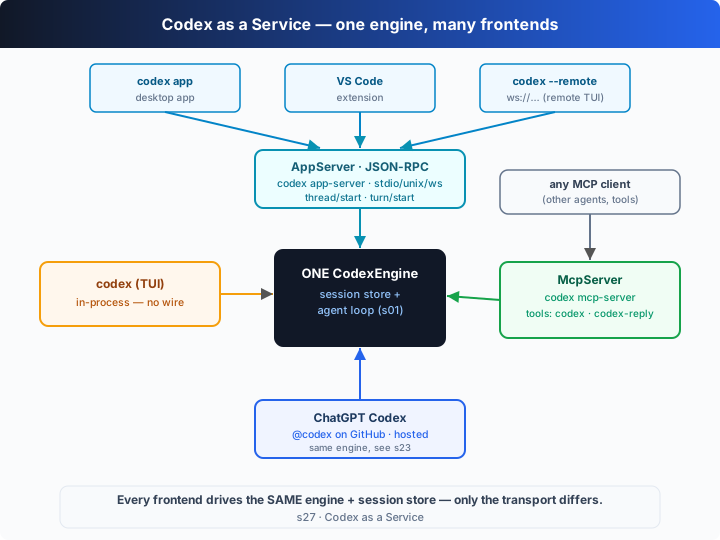
The key insight in one line: there is one engine; there can be many frontends. Turn "agent loop + session store" into a CodexEngine, then put a few transports/protocols in front of it — in-process direct calls, JSON-RPC (app-server), MCP (mcp-server). Each frontend just picks one of those paths in. The loop itself does not change by a single line.
Real Codex (v0.144.x) mounts all of these frontends onto the same engine:
| Frontend | Real command / entry | Transport | It is… |
|---|---|---|---|
| TUI / CLI | codex, codex exec | in-process (no transport) | drives the engine directly |
| Remote TUI | codex --remote ws://host:port | websocket | attaches a TUI to a remote app-server |
| Desktop app | codex app [PATH] | app-server protocol | the official desktop frontend |
| VS Code extension | (inside the editor) | app-server protocol | the first-party IDE frontend |
| app-server | codex app-server --listen <URL> [experimental] | stdio/unix/ws | runs the engine as a service |
| remote-control | codex remote-control start|stop|pair [experimental] | app-server w/ remote control | daemon + pairing code |
| exec-server | codex exec-server --listen <URL> [EXPERIMENTAL] | ws (default)/stdio | standalone exec service |
| Codex as a tool | codex mcp-server | MCP (stdio) | the engine being called, exposed as tools |
| Hosted surfaces | ChatGPT Codex · GitHub @codex | hosted cloud | the same engine, in the cloud (see s23) |
codex mcp-server turns the engine into a tool (verified against the local CLI): the server is named codex-mcp-server and exposes exactly two tools — codex (open a session and run it) and codex-reply (continue by thread id). Any MCP client can then "call Codex."
codex app-server turns the engine into a service: --listen picks the transport (stdio:// by default, unix://PATH, ws://IP:PORT, off), and clients call thread/start over JSON-RPC to open a thread and turn/start to run a turn, with progress streaming back as */started and item/completed notifications. The desktop app, the VS Code extension and the remote TUI are all clients of this one protocol.
How It Works
Translate "one engine, many frontends" into TypeScript. The core is CodexEngine (session store + the s01 loop + event emission); three frontends then attach to it.
Step 1: CodexEngine — a Map holding every thread; prompt() is just the s01 loop (call the model → run tools → feed back), except it emits an event at each step. Event names reuse the codex exec --json dot style (s23).
class CodexEngine {
  private sessions = new Map<string, Session>();
  private listeners = new Set<Listener>();
  on(l: Listener) { this.listeners.add(l); return () => this.listeners.delete(l); }
  private emit(ev: EngineEvent) { for (const l of this.listeners) l(ev); }

  newThread(cfg: Partial<ThreadConfig> = {}, cwd?: string): Session { /* …build a thread, store it… */ }

  async prompt(id: string, text: string): Promise<string> {
    const s = this.get(id);
    if (s.turns === 0) this.emit({ type: "thread.started", threadId: id });
    this.emit({ type: "turn.started", threadId: id });
    // …s01 loop: callModel → run function_call → feed back into thread…
    this.emit({ type: "item.completed", threadId: id, item: { type: "agent_message", text: finalText } });
    this.emit({ type: "turn.completed", threadId: id, usage: {…} });
    return finalText;
  }
}
Step 2: Door 1 — the CLI/TUI, attached in-process. It newThreads, subscribes to engine events, and renders tool calls and the final message as text. There is no transport at all — it calls engine.prompt() directly.
function attachCli(engine: CodexEngine) {
  return { async run(task, cfg = {}) {
    const s = engine.newThread(cfg);
    const off = engine.on((ev) => { /* render only this thread's item.completed */ });
    try { return await engine.prompt(s.id, task); } finally { off(); }
  } };
}
Step 3: Door 2 — the app-server, across a "wire." A client connects and gets a request(method, params); the engine's dotted events are translated into the app-server's slashed notifications (thread.started→thread/started, item.completed→item/completed, …). Request methods use the real v2 protocol names: thread/start opens a thread, turn/start runs a turn on a given thread.
class AppServer {
  constructor(private engine: CodexEngine) {}
  connect(notify) {
    // engine events (exec dots) → app-server notifications (v2 slashes)
    const close = this.engine.on((ev) => notify(ev.type.replace(".", "/"), ev));
    return { close, request: (m, p = {}) => this.dispatch(m, p) };
  }
  private async dispatch(method, p) {
    switch (method) {
      case "thread/start": { const s = this.engine.newThread(p.config ?? {}, p.cwd);
                             return { thread: { id: s.id }, model: s.model, cwd: s.cwd, sandbox: s.sandbox }; }
      case "turn/start":   return this.engine.prompt(String(p.threadId), String(p.input));
      // …initialize…
    }
  }
}
Note that turn/start and "continue a thread" are the same engine call — the real protocol has no separate thread/prompt/thread/reply either; continuing a conversation is just another turn/start on the same threadId.
Step 4: Door 3 — codex mcp-server, the engine as callee. toolsList() returns those two real tools; toolsCall("codex", …) opens a fresh thread and runs a task, toolsCall("codex-reply", …) continues on an existing thread by threadId.
class McpServer {
  constructor(private engine: CodexEngine) {}
  toolsList() {
    return [
      { name: "codex", description: "Run a Codex session. …" },
      { name: "codex-reply", description: "Continue a Codex conversation by providing the thread id and prompt." },
    ];
  }
  async toolsCall(name, args) {
    if (name === "codex")       { const s = this.engine.newThread(cfgFrom(args), args.cwd);
                                  return { threadId: s.id, text: await this.engine.prompt(s.id, args.prompt) }; }
    if (name === "codex-reply") { const id = String(args.threadId ?? args.conversationId);
                                  return { threadId: id, text: await this.engine.prompt(id, args.prompt) }; }
  }
}
Core insight: the demo's punchline is its last step — the MCP door uses codex-reply to continue the very thread Door 1 (the CLI) just opened (thr_1). Three frontends (in-process CLI, the wire-crossing app-server, the called mcp-server) share one CodexEngine and one session store, so any of them can pick up another's conversation. What changes is never the loop, but which process the loop lives in, across which transport, and who drives it. In the offline demo you can watch thread=thr_1 get pushed to 4 items by the CLI, then to 6 by MCP — proof that it really is the same engine and the same thread.
Try It
Teaching-demo note: the code only creates a "workspace" with
README.md/app.tsunder the system temp dir (os.tmpdir()); it never touches your project.
Runs with no API key: this chapter is a self-running demo, no REPL. Without OPENAI_API_KEY a scripted model drives the loop — it runs one shell command, then replies with a message that cites its thread id, turn number and model/sandbox/approval, so you can watch every door's settings reach the same engine.
Setup (first run):
npm install
cp .env.example .env        # fill in OPENAI_API_KEY and MODEL_ID to run the real model
Run:
npx tsx s27_codex_service_surfaces/code.ts                       # offline demo: three doors, one engine
OPENAI_API_KEY=sk-... npx tsx s27_codex_service_surfaces/code.ts # real model
Try these experiments:
- Run it and read each door's
[offline demo]line: Door 1 issandbox=workspace-write, Door 2 is configured tosandbox=read-onlybythread/start, and Door 3'scodextool passesapproval-policy=never— same engine, each with its own config. - Watch the last step:
codex-replycontinuesthr_1(the thread Door 1 opened); its "turn 2, 6 items" proves the session store is shared. - Run once with a real key: the engine, the three frontends and the event stream are unchanged — only
callModelbecomes a real Responses call, andcodex-replystill continues the conversation.
What to watch: in Door 2, why are turn/start and "continue the chat" the same method? What happens if you point codex-reply's threadId at thr_2 (the thread Door 2 opened)?
What's Next
Codex's "morphology" is now complete: s21's CLI doors, s23's unattended review/CI/cloud, and this chapter's service frontends — all converge on the single s01 loop. But one topic we've been skirting: once the engine can be driven remotely and invoked by other agents, how do you guard the safety boundary of "which files it may touch and which commands need a human to approve"?
s28: Sessions, Sandbox & Safety, advanced → the resume/fork/archive lifecycle, codex sandbox, --add-dir, bypass modes, guardian approvals, trusted projects and feature flags, all in one pass. To revisit the 30-line loop at the start, go to s01.
Into the Codex source
The following is based on the overall architecture of OpenAI's open-source
openai/codexrepo (codex-rs, the Rust implementation), and on the real output ofcodex <sub> --help,codex features listandcodex app-server generate-json-schemafrom the locally installedcodexCLI (v0.144.6). The teachingCodexEngine+ three frontends are the minimal skeleton of this service surface; the differences are engineering detail and the closed-source hosted parts.
The teaching CodexEngine ≈ codex-rs's core session kernel; the three frontends ≈ the real TUI / app-server / mcp-server entries. Each item below expands on that core.
1. mcp-server: two tools, the engine as callee (verified)
The teaching McpServer corresponds exactly to the real codex mcp-server (stable, not experimental). Verified locally: the codex-mcp-server server exposes exactly the codex and codex-reply tools. codex's input keys are prompt, model, cwd, sandbox, approval-policy, config, base-instructions, developer-instructions, compact-prompt (i.e. "accepts a Codex Config"); codex-reply's input keys are threadId/conversationId and prompt. This matches the teaching version verbatim — it lets any MCP client treat "run a Codex task" as one tool call, returning a thread id for later codex-reply follow-ups. The direction flips: the engine no longer drives others, it is driven.
2. app-server: one JSON-RPC protocol, many first-party clients
The teaching AppServer corresponds to the real codex app-server (marked [experimental]). The key points match — --listen picks the transport (stdio:// by default, unix://PATH, ws://IP:PORT, off), and clients speak JSON-RPC. The real protocol's method names are generated by codex app-server generate-json-schema --out <DIR> (with generate-ts for TypeScript bindings): at its core are thread/start (open a thread) and turn/start (run a turn), with progress streaming back as thread/started, turn/started, item/completed, turn/completed notifications; there is also a full thread-lifecycle set — thread/resume, thread/fork, thread/archive, and more (see s28). The teaching version spells out the "dotted event → slashed notification" mapping; the real turn/start acks immediately and then streams deltas over notifications, whereas the teaching version awaits the whole turn for clarity. The desktop app (codex app) and the VS Code extension are first-party clients of exactly this one protocol.
3. remote-control / exec-server / --remote: daemons and remote attach
codex remote-control ([experimental], subcommands start/stop/pair) is an "app-server daemon with remote control enabled," using a short-lived pairing code (pair) to admit remote clients; codex app-server daemon (start/restart/enable-remote-control/stop/version/bootstrap) manages that local daemon's lifecycle. codex exec-server ([EXPERIMENTAL]) is a standalone exec service whose --listen defaults to ws://IP:PORT, and which can even use --remote <URL> to register itself as a remote execution environment. The top-level codex --remote <ADDR> (accepting ws://, wss://, unix://) attaches a local TUI to such a remote app-server — the real form of this chapter's "Door 2." These subcommands are all still experimental; names and behavior may change.
4. Hosted surfaces: ChatGPT Codex and GitHub @codex
Codex in ChatGPT, and the @codex integration in GitHub PRs/issues, are OpenAI-hosted services whose internals are not in the open-source codex-rs. But the thesis holds: they drive the same engine — running the s01 loop in an isolated cloud environment and returning results as PR comments / diffs (s23's Codex Cloud is this line). The teaching version doesn't build a separate "cloud frontend," because s23 already covered "moving the same loop onto someone else's container"; this chapter's point is that hosted and local frontends share the same engine semantics.
One line: desktop app, VS Code extension, remote TUI, MCP tool, hosted cloud — none of them is a new agent. Almost all of the real complexity lives on the "transport & protocol" side — the JSON-RPC method set, websocket auth, daemon pairing, the MCP handshake — not in the loop itself. Internalize "one engine + N transports, the loop unchanged" and this whole service surface falls into place.