The Plan Tool
Planning & ControlAn Agent Without a Plan Drifts
Explicit plans keep long-running work visible and correctable — Codex exposes this as the update_plan tool.
s01 → s02 → s03 → s04 → s05 → s06 → s07 → ... → s20
"A plan the harness can see" — declare the steps before you act, so a long task can't lose them.
Harness layer: planning — make the agent state its steps before it starts.
The Problem
Give the agent a multi-step task: "Convert every script to TypeScript, run the tests, fix whatever fails."
It edits three files, runs the tests once, sees two failures, and buries itself in fixing them. Somewhere in there it forgets the original goal was "convert to TypeScript" — the two failing tests swallowed all its attention.
The longer the conversation, the worse it gets: tool results keep filling the context, and the weight of that first instruction is diluted turn after turn. A ten-step refactor starts improvising at step three, because steps four through ten were pushed out of its attention long ago.
The problem isn't that the model isn't smart enough. It's that the plan lives only in the model's head. The harness can't see it, so it can't pull the agent back when it drifts.
The Solution
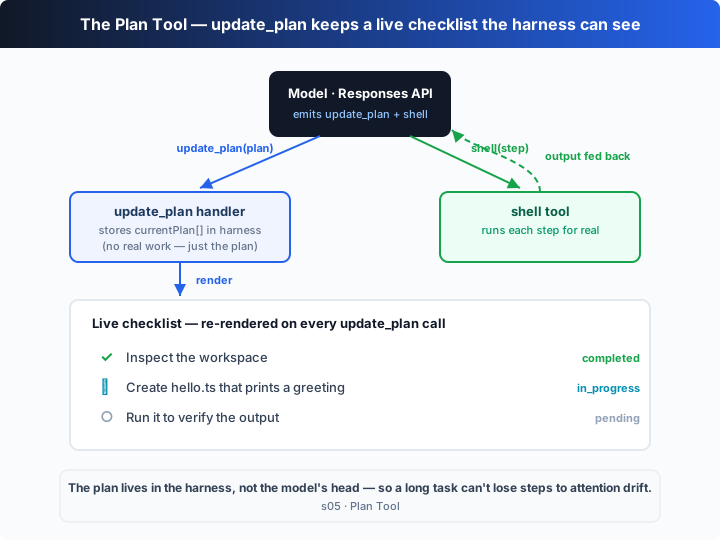
Give the model an update_plan tool: before acting, it declares the whole step list; then, every time a step starts or finishes, it rewrites the same list and sends it back. The plan is no longer a thought in the model's head — it's a function_call. When the harness receives it, it stores the list in its own state and renders it as a live-updating checklist.
| signal | meaning | harness action |
|---|---|---|
update_plan (all pending) | the model declares its plan before acting | store currentPlan[], render the full checklist |
update_plan (a step turns in_progress) | the model starts that step | rewrite state, re-render (only one step in_progress at a time) |
update_plan (a step turns completed) | that step is done | rewrite state; the ○ becomes a ✓ |
The key: this tool does no real work — it can't read a file or run a command. Its only job is to let the harness watch the plan change. The shell tool does the actual work, and the two alternate inside the loop.
How It Works
Add one tool on top of the s01 loop, step by step:
Step 1: define the step type and the update_plan tool. status can only be one of three values.
type PlanStep = { step: string; status: "pending" | "in_progress" | "completed" };

// tool schema (excerpt): takes a whole plan, not a diff
{
  name: "update_plan",
  parameters: {
    plan: { type: "array", items: { step: "string", status: "pending|in_progress|completed" } },
  },
}
Step 2: the tool handler stores the plan in harness state and re-renders the checklist. The string it returns goes back to the model as a function_call_output.
let currentPlan: PlanStep[] = [];

function updatePlan(plan: PlanStep[]): string {
  currentPlan = plan;
  const done = plan.filter((s) => s.status === "completed").length;
  console.log(`## Plan  (${done}/${plan.length} done)`);
  for (const s of plan) console.log(`  ${ICON[s.status]} ${s.step}`);
  return `Plan updated: ${done}/${plan.length} steps completed.`;
}
Step 3: dispatch on the tool name inside the loop. update_plan renders; shell actually executes.
if (call.name === "update_plan") {
  result = updatePlan(args.plan);       // only updates the plan and redraws
} else {
  result = runShell(args.command);      // does the real work
}
input.push({ type: "function_call_output", call_id: call.call_id, output: result });
Step 4: each turn the model sees the previous step's function_call_output ("Plan updated: 1/3 ..."), so it updates the plan or runs the next step. The loop itself is identical to s01 — it just has one more dispatch branch.
Assembled, the model's typical trajectory is: update_plan (all pending) → shell (step 1) → update_plan (1 completed, 2 in_progress) → shell (step 2) → …→ update_plan (all completed) → final answer.
Core insight: update_plan adds no execution capability to the agent — it adds visibility into the plan. By externalizing the plan into the harness, the model has to account for its progress against it every turn. That is exactly why a long task doesn't lose steps.
Try It
Teaching demo note: the offline demo creates and runs a
hello.tsin the current directory. Run it in a scratch directory, or delete the file afterwards.
No API key needed: without OPENAI_API_KEY, the chapter's built-in offline model acts out the whole "plan → work the steps → check them off" flow.
Setup (first run):
npm install
cp .env.example .env        # fill in OPENAI_API_KEY and MODEL_ID to run the real model
Run:
npx tsx s05_plan_tool/code.ts                # offline demo model
OPENAI_API_KEY=sk-... npx tsx s05_plan_tool/code.ts   # real model
Try these prompts:
Rename every script to TypeScript, run the tests, fix what failsSet up a small package: tsconfig, an entry file, and a build scriptRefactor this file into modules and verify it still runs
Watch for: is the first tool call update_plan? How many steps does the plan list? As it works, do statuses move pending → in_progress → completed, with only one step in_progress at a time?
What's Next
The agent can plan now. But if a single step is itself a huge task — "refactor the whole auth module" — checking a box on a list isn't enough. Behind that one step are dozens of small operations, and piling them all into the same conversation drowns the context anyway.
s06 Subagents → delegate that big step to a sub-agent: it gets its own clean context, focuses on the one job, and brings only the conclusion back to the main thread.
Into the Codex source
The following is based on the overall structure of OpenAI's open-source
openai/codexrepo (codex-rs, written in Rust). The chapter'supdate_planis the minimal skeleton of Codex's plan tool; every difference is production-grade state management and UI rendering.
The chapter's updatePlan ≈ Codex's plan-tool handler. Each item below hardens that core.
1. The plan tool is a "core built-in", not sandboxed
Among the tools Codex offers the model, besides the ones that execute for real (shell, apply_patch), there is a plan tool. Its status is special: when the model emits an update_plan call, the core turn loop does not hand it to the sandbox or the approval policy — it handles it inside the harness, updating the plan in session state and immediately returning a confirmation to the model. The chapter reproduces exactly this special path with "if (call.name === "update_plan") take the render branch": the plan tool changes harness state, not the filesystem.
2. Status fields: pending / in_progress / completed, exactly these
Codex's plan-item status enum matches the chapter exactly: pending, in_progress, completed. The accompanying instructions nudge the model to: create a plan for complex tasks, keep only one step in_progress at a time, and rewrite the whole list on every change. The chapter writes that guidance into INSTRUCTIONS and asks for "the whole plan each time, not a diff" — consistent with the real implementation, because what the harness stores is the current full plan: it replaces it wholesale on receipt, never merges.
3. Rendering is event-driven, not polled
The chapter console.logs a checklist inside updatePlan. Codex's TUI is asynchronous: after the core handles the plan tool it emits a "plan updated" event, and the front end subscribes to that event to redraw the checklist in its status pane (while the scrolling event stream carries on). In other words, "store the state" and "paint it" are decoupled, connected by an event bus. The chapter merges the two into one function so the reader sees the "call → state → render" chain at a glance.
4. The plan goes into the rollout too, and resumes with the session
Codex persists a session as a rollout (see s09), and the plan, as part of session state, is written there as well. That means codex resume on a long session brings back the checklist you hadn't finished checking off. The chapter keeps currentPlan in process memory, cleared on exit — a deliberate simplification; persistence is left for s09.
In one line: Codex's plan tool is, at its core, "the model rewrites the whole step list → the harness stores and redraws it". Every extra mechanism — built-in dispatch, event-driven rendering, rollout persistence — exists to make that loop real-time and resumable in a production TUI. See the trunk clearly first and the details unfold on their own.